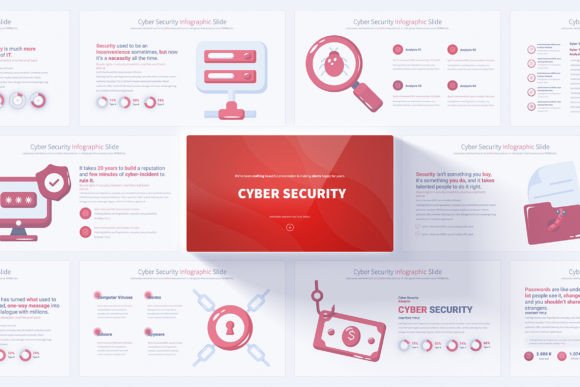
Cyber Security PowerPoint Template: Present with Confidence
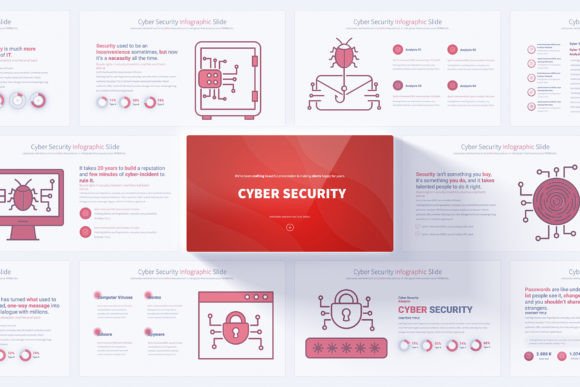
Communicating complex security strategies to stakeholders, clients, or team members demands clarity and visual precision. A well-structured slide deck can transform dense technical information into an accessible narrative that drives decision-making. The Cyber Security PowerPoint Template offers exactly that foundation: a carefully designed collection of infographics and slides built specifically for professionals who need to present cyber defense concepts without sacrificing polish or professionalism.
What makes this resource particularly valuable is its blend of ready-made structure and deep customization potential. With 17 unique slides that expand into 204 total variations, you gain access to a visual toolkit that covers everything from threat assessment overviews to incident response timelines. Each slide works as a building block, letting you assemble presentations that feel cohesive rather than cobbled together from mismatched sources.
What Sets This Template Apart
The template operates on a Slide Master foundation, which means you edit core elements once and watch those changes ripple across every relevant slide automatically. This approach saves hours of manual adjustment while ensuring brand consistency throughout the deck. The 12 color variations on a light background give you flexibility without overwhelming choices—enough range to match corporate identity guidelines while maintaining readability under various projection conditions.
At 16:9 Full HD resolution, every infographic, chart, and icon renders sharply on modern displays and conference room screens. The handmade infographics avoid the generic stock-feel that plagues many template libraries; instead, each visual element carries a crafted quality that signals attention to detail. When you present a network architecture diagram or a data encryption flow, the audience intuitively trusts information that looks purpose-built rather than borrowed.
Animated Transitions and Editable Elements
Motion in presentations often becomes a distraction, but the animated transitions included here serve a functional purpose. They guide attention sequentially through complex processes—revealing layers of a security stack, animating the stages of a breach response, or walking viewers through a risk assessment matrix one quadrant at a time. Each element remains fully editable, meaning you can adjust timing, sequence, or remove animations entirely based on the setting.
The bonus 280 fully editable vector icons extend the template's utility far beyond the included slides. Need a visual for endpoint protection, firewall configuration, or user authentication? You likely already have an icon ready to go. Because these are vector-based, resizing never compromises quality, and color adjustments take seconds rather than requiring external editing tools.
Who Gains the Most from This Resource
The obvious audience includes cyber security analysts, IT managers, and CISOs who regularly brief leadership on threat landscapes and mitigation strategies. However, the template's adaptability opens doors for several other professional groups who might not immediately recognize its relevance.
Small business owners without dedicated security staff can use these slides to educate employees about phishing awareness, password hygiene, and data handling protocols. The visual nature of the infographics makes security concepts accessible to non-technical team members who might otherwise tune out during dense verbal explanations. A single well-designed slide about recognizing social engineering attempts can accomplish more than a lengthy email memo.
Educators and trainers in vocational programs and corporate learning environments will appreciate the ability to break down certification topics—CompTIA Security+, CISSP domains, or ethical hacking methodologies—into digestible visual chunks. The template structure supports pedagogical flow: opening slides establish context, infographic-heavy sections deliver core content, and closing slides reinforce key takeaways.
Freelance designers and presentation specialists serving clients in the tech sector can accelerate project turnaround while maintaining high creative standards. Rather than building cyber-themed visuals from scratch, they start with a professional base and invest their time in strategic customization that aligns with each client's unique voice.
Creative Applications Across Different Contexts
Beyond traditional boardroom presentations, these slides adapt to several formats that expand their usefulness throughout the year.
Client Onboarding and Security Orientation
When bringing new clients into a service relationship that involves data sharing or platform access, a customized slide deck establishes security expectations early. Use the template to walk through encryption standards, access controls, and incident notification procedures. The professional design signals competence and reassures clients that their information receives serious protection.
Internal Audit and Compliance Reporting
Regulatory frameworks like GDPR, HIPAA, and PCI DSS require documented evidence of security practices. Transform audit findings and compliance status updates into clear visual reports using the template's comparison and progress slides. Stakeholders absorb compliance gaps and remediation timelines faster when data appears in structured infographics rather than dense spreadsheets.
Conference Talks and Webinar Content
The 16:9 resolution aligns perfectly with virtual presentation platforms and stage screens. Whether you're delivering a breakout session at a security conference or hosting a LinkedIn Live about emerging threats, the template provides a visual anchor that keeps remote audiences engaged. The animated transitions help maintain pacing during virtual presentations where attention spans notoriously shorten.
Proposal and Pitch Decks
Security vendors and managed service providers pitching solutions to prospective clients can leverage the professional opening and closing slides to frame compelling narratives. A proposal deck built with this template communicates that your organization practices the professionalism it preaches—a subtle but powerful trust signal during procurement decisions.
Practical Customization Without the Learning Curve
The user-friendly design means you won't need advanced PowerPoint skills to produce polished results. The included PDF documentation walks through basic customization steps, but the intuitive Slide Master structure makes most adjustments self-explanatory. Replace placeholder text with your content, swap colors to match brand guidelines, and reposition infographic elements to fit your specific data stories.
For teams collaborating on presentations, the PPTX format ensures compatibility across Microsoft 365 environments and most alternative presentation software. Multiple team members can work on different sections simultaneously when the file lives in a shared cloud location, with the consistent design framework preventing visual drift between contributors.
Keeping Results Clear and Audience-Friendly
Effective security communication balances technical accuracy with accessibility. When customizing slides, resist the temptation to pack every available space with information. The template's layout provides natural breathing room—use it. A single clear infographic explaining a ransomware attack chain outperforms five slides crammed with bullet points. Let the handmade visuals carry explanatory weight while your spoken narrative adds context that slides alone cannot convey.
Consider your audience's security literacy level before finalizing content. A presentation for a board of directors might emphasize business impact and risk quantification using the template's chart-heavy slides. The same topic presented to a security operations team could pivot toward technical process flows and tool-specific workflows, using detailed infographic slides to map incident response procedures.
Maintaining Consistency Across Multiple Presentations
Organizations that deliver frequent security presentations benefit from developing a core template library using the 204-slide foundation. Select a color variation that aligns with brand standards, establish preferred slide layouts for common scenarios like monthly threat briefings or quarterly risk reviews, and save these configurations as reusable custom themes. Over time, your team builds a presentation system rather than starting each deck from zero.
The fully editable vector icons play a key role here. By standardizing icon usage—specific symbols for phishing, DDoS attacks, insider threats, and other recurring topics—you create a visual language that audiences recognize across presentations. This consistency strengthens message retention and reduces the cognitive load required to interpret new slides.
Why Visual Quality Matters in Security Communication
Security professionals sometimes prioritize content over presentation aesthetics, assuming that accurate information will speak for itself. In practice, design quality directly influences how seriously audiences engage with security messages. A visually cohesive presentation signals preparedness and attention to detail—qualities that stakeholders value in the individuals and teams responsible for protecting organizational assets.
The handmade cyber security infographics address a common pain point: generic stock imagery that undermines credibility. When you display a uniquely crafted network topology diagram or a custom threat heatmap, the audience perceives original thinking rather than recycled templates. That perception matters whether you're advocating for budget increases, explaining a security incident to affected parties, or training employees on new protocols.
Investing in presentation quality also respects your audience's time. Busy executives and overwhelmed teams appreciate information delivered in formats that prioritize comprehension speed. Well-designed slides structure thinking in ways that dense documents cannot, making the Cyber Security PowerPoint Template a practical tool for anyone who values both substance and presentation in their professional communication.