How the Reflect Keynote Template Simplifies Professional Presentation Design
Finding a presentation template that balances visual impact with practical usability can take more time than building the slides themselves. Many templates look impressive in preview galleries but become difficult to work with once you open them. Others feel too basic, lacking the design elements needed to communicate complex information clearly. The Reflect Keynote Template takes a different approach by combining a clean, contemporary aesthetic with an emphasis on ease of editing. Understanding what this template offers, how it compares with other options, and where its strengths and limitations lie can help you decide whether it fits your next project.
What Gives the Reflect Keynote Template Its Distinct Character
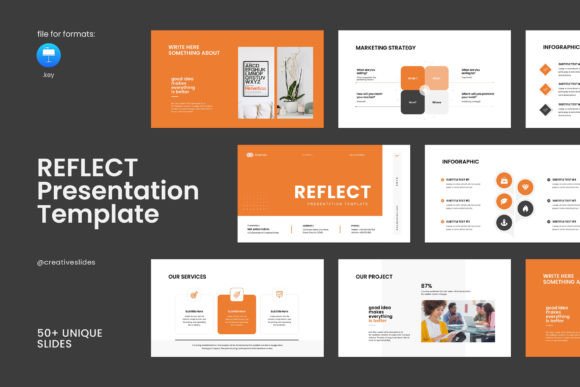
The Reflect Keynote Template is built around a simple but polished design language. Rather than relying on bold colors or elaborate animations that might distract from content, it leans toward a restrained, modern look. This makes it suitable for professionals who need to present company profiles, project updates, creative portfolios, or business proposals without the design itself competing for attention. The template includes 51 slides laid out in a 16:9 Full HD resolution of 1920 by 1080 pixels, which matches most modern screens and projectors without awkward letterboxing or scaling issues.
What sets the Reflect Keynote Template apart from many competitors is how it handles visual variety within a unified framework. Instead of repeating the same slide structure with minor text changes, it incorporates creative photo layouts, infographics, tables, vector icons, and diagrams. These elements give you room to present data visually, highlight key metrics, or break up text-heavy sections. The included bonus of 4,000 vector icons adds another layer of flexibility, especially for users who frequently need visual shorthand for concepts like growth, collaboration, or technology.
Who the Template Is Designed For
The Reflect Keynote Template targets a broad audience by offering compatibility across different skill levels and operating systems. On the technical side, it works natively with Apple Keynote, the presentation software included with macOS and iOS devices. But because the template also functions on Windows through iCloud or exported formats, it reaches beyond the typical Apple-only user base. This dual-platform usability is not universal among Keynote-focused templates, many of which assume the user works exclusively within the Apple ecosystem.
More importantly, the template emphasizes accessibility for non-designers. The editing process uses master slides, drag-and-drop image replacement, and fully resizable graphics. You do not need experience with Keynote's advanced features or a background in graphic design to produce a cohesive presentation. The free fonts used throughout come with links provided in the help file, removing the frustration of opening a template only to find missing typefaces. These practical decisions make the Reflect Keynote Template a realistic choice for small business owners, freelancers, educators, and marketing professionals who handle their own presentation design but lack formal training.
Comparing Pre-Made Templates With Custom Design Approaches
One way to understand where the Reflect Keynote Template fits is to contrast it with the alternatives you might consider when preparing a presentation. Broadly, these fall into a few categories: building slides from scratch, hiring a designer, using free built-in themes, or purchasing a premium template like this one.
Building from scratch gives you full control but demands a significant time investment. Even skilled users can spend hours adjusting alignment, choosing color palettes, and creating consistent layouts across dozens of slides. Hiring a professional designer solves the quality problem but introduces cost and turnaround time that may not work for tight deadlines or limited budgets. Free built-in themes in Keynote or other software offer speed but often look generic and may not include the specialized slide types—like data tables or comparison infographics—that business presentations need.
The Reflect Keynote Template occupies a middle ground. It provides professionally designed layouts ready to populate with your content, reducing time spent on design decisions while still allowing extensive customization. The 51-slide total means you are likely to find a structure that matches your content flow, whether you are presenting a five-slide pitch or a thirty-slide quarterly review. You can hide, duplicate, or reorder slides freely, so the template scales to different presentation lengths without forcing a rigid sequence.
Strengths That Matter in Day-to-Day Use
Several features of the Reflect Keynote Template stand out when you move beyond the product description and consider real-world usage scenarios. The theme color option deserves particular attention. Changing a presentation's color scheme across all slides with a single adjustment is not a given in every template, but it is built into this one. For teams that need to match brand guidelines or individuals who want to adapt the look for different audiences, this feature alone can save considerable time compared with manually recoloring each element.
The inclusion of vector-based graphics and icons also has practical weight. Because these elements remain sharp at any size and can be recolored without quality loss, you avoid the pixelation issues that plague templates relying on raster images. The drag-and-drop image replacement means you can swap placeholder photos with your own visuals in seconds rather than minutes. For someone preparing a presentation under time pressure, these small efficiencies compound into a noticeably smoother workflow.
Another less obvious strength is the PDF support documentation. Templates that ship without clear instructions often lead to frustration and support requests. Having a detailed guide reduces the learning curve and helps users take advantage of features they might otherwise overlook, such as master slide editing or advanced layout options.
Understanding the Tradeoffs
No template suits every situation, and the Reflect Keynote Template has characteristics worth weighing against your specific needs. The most significant consideration is that images used in the demo previews are not included with the template. This is standard practice across the industry due to licensing restrictions on stock photography, but it means you will need to source your own high-quality images to achieve the same polished look shown in the product gallery. If your organization lacks access to a photo library or you do not have time to find suitable replacements, the final result may feel less complete than the demo suggests.
The template also relies on Apple Keynote as its primary editing environment. While it can be used on Windows through iCloud's web-based Keynote or by exporting to other formats, the editing experience is optimized for the native Mac application. Windows users who need to make frequent changes may encounter minor friction with file conversions or formatting adjustments. This does not make the template unusable on Windows, but it is a factor to consider if your workflow centers entirely on Microsoft PowerPoint or Google Slides.
Additionally, 51 slides is a generous count, but the distribution of slide types matters as much as the total number. If your presentation relies heavily on a specific format—say, detailed financial tables or animated timelines—you may want to verify that the template includes enough variations of those particular layouts before committing. Most business use cases will be covered, but highly specialized content might require supplementary design work.
When the Reflect Keynote Template Is a Strong Choice
Certain scenarios align particularly well with what this template offers. If you are a Mac user who prefers Keynote over PowerPoint for its smoother interface and typography handling, the Reflect Keynote Template fits naturally into your existing workflow. Creative professionals presenting portfolios, agencies showcasing client work, or startups pitching to investors will benefit from the clean, contemporary aesthetic and the photo-focused layouts that let visual work take center stage.
The template also suits situations where you need to produce multiple presentations over time. Because the master slides and theme color options make rebranding straightforward, you can reuse the same template structure for different projects, each with its own visual identity. This creates consistency across your communications without the repetitive effort of starting from zero each time.
For users who feel anxious about presentation design, the combination of clear instructions, free support from the designer, and intuitive editing features lowers the barrier to creating something that looks professional. The emphasis on drag-and-drop functionality and resizable graphics means you can focus on your message rather than wrestling with the software.
Situations Where Another Approach Might Fit Better
There are also cases where looking beyond the Reflect Keynote Template makes sense. Teams that collaborate heavily in Google Slides may find the conversion process adds unnecessary steps compared with using a template built natively for that platform. Organizations with strict IT policies that limit software installation or prefer PowerPoint as the standard tool might also encounter workflow friction, even though the template can technically be used on Windows.
Presenters who need extensive animation or interactive elements should also consider their options carefully. Keynote supports sophisticated animations, but not all templates are built to showcase them equally. If your presentation style depends on complex builds, motion graphics, or embedded multimedia, confirm that the template's structure supports those features without requiring extensive modification.
Budget-conscious users comparing free alternatives might weigh the cost against the time savings and professional quality. Free templates can work for internal meetings or informal settings, but client-facing or investor presentations often justify the investment in a more polished, fully-featured option. The calculus depends on the stakes of your presentation and how much your own time is worth.
Practical Considerations for Making Your Decision
When evaluating the Reflect Keynote Template or any similar resource, a few questions can clarify whether it meets your needs. First, consider your primary editing environment. If Keynote is your main tool and you value the design refinements it enables, this template will feel natural to use. If you switch between multiple platforms or collaborate with team members on different systems, test the cross-platform workflow before committing.
Next, assess your image resources. Since the demo photos are not included, having access to a stock photo subscription, an internal image library, or original photography will help you achieve a finished look that matches the template's potential. If sourcing images feels like a barrier, factor that into your timeline and budget.
Finally, think about the presentation's purpose and audience. A clean, modern aesthetic works well for most professional settings, but highly creative fields might want something more experimental, while conservative industries might prefer even more traditional layouts. The Reflect Keynote Template occupies a versatile middle space that adapts to many contexts, but the final judgment depends on how well its tone aligns with your audience's expectations.
The Broader Landscape of Presentation Design Choices
The Reflect Keynote Template exists within a larger ecosystem of presentation resources that range from free built-in themes to bespoke agency designs. Its position is defined by offering a middle path: more polished and feature-rich than free options, more accessible and faster than custom work, and specifically tuned for Keynote users who want professional results without mastering design software.
What makes this particular template worthy of consideration is not a single standout feature but the cumulative effect of thoughtful design decisions. The 4,000-icon pack, theme color options, master slide architecture, and cross-platform potential add up to a tool that respects both the user's time and the audience's expectations. Whether that combination matches your specific situation comes down to the factors explored here—your tools, your content, your timeline, and the impression you want to leave on the people watching your presentation.