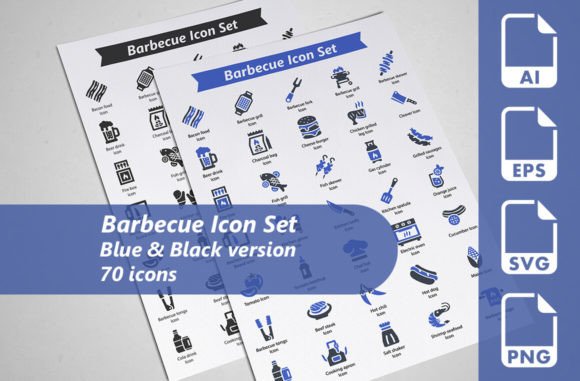
Barbecue Icon Set: A Versatile Collection of 70 Grill and BBQ Design Icons
Design projects with a food, grilling, or outdoor cooking theme often call for a specific type of visual element—something that communicates warmth, flavor, and social gathering without relying on overused stock photography. A well-made icon set can solve this need efficiently, offering uniform graphics that scale across digital and print formats while saving a designer significant time. The Barbecue Icon Set provides exactly that: a curated package of 70 meticulously designed barbecue-themed icons, delivered in multiple file formats and two cohesive color variations. This article examines the set’s composition, technical strengths, practical applications, and who stands to gain the most from integrating it into their workflow.
What the Barbecue Icon Set Contains
At its core, the set offers 70 individual icons, each one crafted to represent a familiar object or action connected to barbecuing and outdoor cooking. You’ll find grill tools like spatulas, tongs, forks, and brushes; equipment pieces such as kettles, smokers, gas grills, and charcoal chimneys; food items like burgers, sausages, steaks, corn, and kebabs; plus complementary symbols for fire, smoke, aprons, gloves, and even sauce bottles. The range allows for building cohesive visual stories without having to source missing pieces from unrelated packs.
A distinguishing feature is the inclusion of two distinct color variants: a clean blue version and a classic black version. This effectively doubles the total count to 140 usable icon files. The blue set suits lighter, contemporary interfaces or summer-themed materials, while the black option adapts to more formal, monochromatic, or print-focused designs. Having both ready to use eliminates the guesswork of recoloring if those tones match your brand palette.
Every icon arrives in four practical file formats:
- Fully editable AI files – native Adobe Illustrator vectors that retain layers and stroke properties for deep customization.
- SVG files at 128×128 pixels – resolution-independent web-friendly format ideal for direct integration into websites, apps, and presentations.
- EPS files at 256×256 pixels – compatible with a wide range of vector software and older print workflows, conforming to the EPS 10 standard.
- Transparent PNG files at 256×256 pixels – ready-to-use raster images with an alpha channel, perfect for quick placement in mockups, social media graphics, or non-vector environments.
This multi-format packaging is a deliberate choice that prioritizes practical usability across different tools and skill levels.
Design Approach and Visual Consistency
Icon sets often fail when individual symbols feel disjointed in weight, angles, or detail level. The Barbecue Icon Set avoids this by applying meticulous uniform styling. Each icon shares the same stroke thickness, corner radius where applicable, and general proportion, creating a tight visual system. The line-style aesthetic—clean, open, and uncluttered—feels modern and works equally well on small mobile buttons or enlarged poster elements.
Because the icons are vector-based at origin, the sharpness holds up at any magnification. When you open an AI or EPS file, you’ll notice organized layers and minimal unnecessary points, which makes further editing more predictable. The blue variation uses a considered mid-range tone that remains legible on both light and dark backgrounds, while the black version provides maximum contrast for utilitarian needs. Neither variation includes overly decorative flourishes that would limit longevity or introduce noise in dense layouts.
This consistency extends to the conceptual clarity of each symbol. A grill grate icon reads instantly as a grill grate, not an ambiguous set of lines. A basting brush is drawn from an angle that makes the silhouette distinct. Such clarity reduces the cognitive load for end users and strengthens the professional feel of any project that incorporates them.
Why Multiple File Formats Matter in Daily Workflows
Working designers and developers rarely stay inside a single software ecosystem. One day you might need icons for a WordPress site, the next for a tri-fold brochure, and later for an app prototype in Figma. The Barbecue Icon Set’s format coverage accommodates this fluidity without forcing extra file conversion steps.
- SVG for web and interactive work: Because SVGs are text-based and scalable, you can load them inline in HTML, style them with CSS, or animate them with JavaScript. The 128×128 source dimensions are irrelevant for vector files—SVG scales losslessly, so the icon remains crisp on high-density displays.
- AI for deep customization: When you need to adjust line weights, change colors entirely, combine icons, or extract parts of a symbol for a logo treatment, having the original AI file is invaluable. It preserves editable strokes and shapes that a simple SVG or EPS export may flatten.
- EPS for legacy and cross-compatibility: Many older print setups, cutting machines, or sign-making software still rely on EPS format. Involving design assets in unusual toolsets becomes smoother when you don't have to reroute through Illustrator each time.
- PNG for quick placement: Not every software handles vectors smoothly. PowerPoint, Canva, email signature builders, or older desktop publishing applications often prefer a high-resolution transparent PNG. At 256×256 pixels, these are large enough for most on-screen uses and modest print jobs.
This structure saves noticeable time in production. You pick the format that matches the immediate need, rather than exporting or converting repeatedly.
Practical Applications Across Projects and Industries
The barbecue theme naturally leans toward food and hospitality, but the icons’ clean style broadens the scope considerably. Here are some realistic scenarios where the set proves useful:
- Restaurant and food truck branding: Menus, signage, loyalty cards, and social media templates benefit from themed iconography that reinforces the cuisine. A burger, grill, and chef hat trio can unify a printed flyer without bespoke illustrations.
- Event materials: Summer festivals, backyard cookout invitations, corporate picnic announcements, or community BBQ fundraisers often need cohesive graphics on short timelines. Icons can replace generic clip art and elevate the visual tone.
- Recipe blogs and cooking apps: Interface elements like ingredient selectors, category markers, or step-by-step cooking guides gain personality when accented with relevant icons. The SVG format integrates directly into most content management systems.
- Retail and e-commerce: Grilling equipment shops, online stores selling spice rubs, or meat subscription services can use the icons on product badges, checkout process visuals, or email headers. The blue version pairs well with fresh, modern brand colors.
- Infographics and editorial content: A magazine piece about barbecuing techniques or a data visualization on charcoal vs. gas popularity becomes more engaging when sprinkled with accurate, unobtrusive icons instead of relying only on charts.
- Presentations and pitch decks: Whether you run a catering business or a startup developing a smart grill, slides look more polished when key points are supported by custom icons rather than default clip art.
In each case, the dual color options give you organic contrast choices. You can use the black set for body text integration and the blue set for highlighted elements, maintaining hierarchy without extra design effort.
Who Benefits Most from the Set
While nearly any project could theoretically use these icons, certain user profiles will get disproportionate value:
- Freelance designers and small agencies: The editable vectors and permissive file types mean you can adapt the icons across multiple client projects without ongoing licensing fees. The one-time asset collection pays for itself quickly when reused for restaurant clients, food brands, or local event collateral.
- Web and app developers: SVG-focused developers will appreciate that each icon is immediately usable and won’t bloat page load times. The consistent sizing and clean code structure make implementation predictable.
- Marketing teams and social media managers: Non-designers who need to produce quick graphics for BBQ-related promotions can rely on the PNG versions without touching illustration software. The icons are recognizable enough to work in carousel posts, stories, and thumbnail graphics.
- Small business owners in the food and hospitality sector: A chef, pitmaster, or café operator with limited design experience can confidently use the PNGs to update a menu, print a window sign, or enhance a Google Business profile image.
- Educators and community organizers: Creating engaging materials for cooking classes, nutrition workshops, or community cookout flyers becomes simpler with ready-made visuals that don’t require attribution or complicated software.
The thread here is time efficiency and professional output without requiring deep design tool skills. Those who already own and use Adobe Illustrator can stretch the value further by tweaking and re-coloring the base AI files.
Quality and Real-World Reliability
Assessing any design asset means looking beyond the preview images. In practice, the Barbecue Icon Set holds up well because of the attention given to clean vector construction. When you inspect an AI file, you typically find closed paths, minimal anchor points, and a lack of rasterized elements—all indicators of a professionally built icon set. This matters because icons with poorly joined lines or embedded images cause problems when you try to scale them or change stroke attributes.
The dual color delivery is a practical convenience, but it’s not a substitute for infinite customizability. If your project requires shades of green, orange, or a specific brand color, you will need to open the AI files and adjust swatches. The good news is that the set is built to make that process straightforward. Similarly, because the SVG and EPS files originate from the same vector source, the rendering consistency across browsers, design apps, and print equipment remains stable.
One point worth noting: the SVG export size is listed at 128×128 pixels, and the EPS at 256×256. For newcomers, this might suggest a resolution limit. However, vector files are inherently resolution-independent; the numeric dimensions are simply a default viewport or artboard size. Once you import or scale the SVG in any capable editor or codebase, you can render it at any size without degradation. The PNG, being raster-based, is fixed at 256×256, which is adequate for most digital and small-print uses. For billboard-level enlargements, you would switch to the AI or EPS source anyway.
Limitations and Considerations
No asset collection fits every possible scenario, and being transparent about where the set may fall short helps align expectations.
- Limited out-of-the-box color range: Blue and black are the only ready-to-use color options. While this reduces decision fatigue, designers who prefer a wider pre-made palette might need to spend additional time recoloring the AI master files. The time investment is modest, but it exists.
- Line-art style specificity: The icons all follow a thin, clean stroke style. If a project calls for filled, flat, or highly detailed illustrative icons, this set won’t match that aesthetic without significant manual reworking. It’s best suited to modern, minimalist applications.
- Theme specialization: With 70 barbecue icons, the set is deep on grilling-related objects, but it doesn’t extend into broader kitchenware, drinkware, or full picnic scenes. You may need to supplement from other icon families if your project requires a wider food and beverage scope.
- Editing software requirement for vectors: While the PNGs are accessible to anyone, fully leveraging the AI and EPS files requires a vector editing program like Adobe Illustrator, CorelDRAW, or Affinity Designer. Users without such tools can still use SVGs in many apps, but advanced customization will be limited.
These aren’t critical flaws so much as parameters that define the set’s optimal usage zone. Understanding them helps you decide if the collection aligns with your specific project needs.
Long-Term Value and Reusability
Unlike subscription-based icon platforms that revoke access once payments stop, a purchased icon set like this becomes a permanent part of your asset library. You can revisit it for future summer campaigns, new menu iterations, or client projects years later without additional fees. The editable AI format ensures you aren’t locked into a single visual direction; if trends shift toward slightly bolder strokes, you can bulk-update the base files and re-export.
Icon consistency also contributes to brand asset longevity. If you use the same set across multiple touchpoints—a restaurant’s website, printed table tents, and delivery app profiles—the visual thread strengthens brand recognition. Because the Barbecue Icon Set is self-contained and stylistically coherent, you avoid the mixed aesthetics that come from stitching together multiple free packs.
Integrating the Set into a Professional Workflow
If you decide to adopt this set, a few good practices can maximize its effectiveness:
- Organize your files immediately after download. Separate the AI, SVG, EPS, and PNG folders clearly. Label the blue and black variants so you don’t confuse them later.
- Create a master AI file for custom colors. If your brand uses a specific palette, set aside 30 minutes to recolor the entire set in Illustrator and export fresh SVGs and PNGs from there. That version becomes your personal default.
- Test SVGs in your target environment early. While the SVGs should work universally, different frameworks occasionally interpret stroke widths or viewBox attributes differently. A quick spot check avoids mid-project surprises.
- Combine icons sparingly. The set’s strength lies in clear, singular symbols. Overcrowding a design with multiple icons next to each other can dilute the impact. Use them to punctuate key points rather than fill every available space.
These steps are straightforward and apply to any icon set, but they help extract the most value from this particular collection given its depth and format options.
When This Set Is the Right Choice
Seasoned designers often keep a short list of go-to icon providers based on style, licensing, and file flexibility. The Barbecue Icon Set earns a place on that list for projects where the theme is specifically grilling-oriented and a refined, uniform line style is desired. The combination of two pre-optimized color variants cuts out the most common first step—deciding between dark or colored icons—and the vector foundation leaves the door open for deeper customization when needed.
For non-designers or small business owners who need high-quality graphics without hiring a professional, the transparent PNGs and ready-made SVG files give you immediate output that looks intentional, not amateurish. The learning curve to implement them is minimal, which lowers the barrier significantly.
In broader terms, the set aligns with a design philosophy that values reusable components over one-off solutions. Every icon you grab from the folder can be resized, recolored, and deployed across dozens of deliverables, making it a genuinely practical asset rather than a decorative afterthought. If your work regularly touches on food culture, hospitality, outdoor events, or culinary content, the collection deserves a close look.