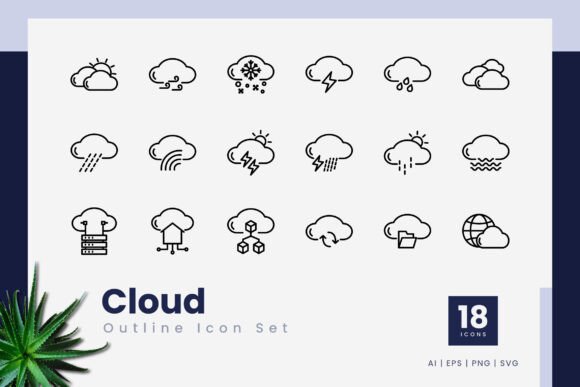
Cloud Outline Icons: Versatile Vector Design
Whether you are refining a mobile app interface, putting together a polished presentation, or crafting an engaging infographic, small visual details matter. The Cloud Outline Icons collection gives you a focused set of 18 distinct symbols built for clarity and flexibility. Because every icon is 100% vector, you can scale them up or down without losing crisp edges, making the set a practical choice for both screen and print projects.
What makes this set especially handy is the outline style. Thin, consistent strokes create a light and modern feel that blends easily with clean user interfaces and contemporary layouts. Instead of solid, heavy shapes, these icons keep things airy while still conveying meaning instantly – a cloud with an upward arrow, a document within a cloud, or a simple upload symbol, for example.
What Exactly Is This Icon Collection?
At its core, the Cloud Outline Icons pack is a small library of editable stroke-based icons themed around cloud computing, data transfer, and online services. You get 18 carefully designed symbols that revolve around cloud storage, syncing, sharing, and connectivity. The set is not overwhelming with hundreds of options that you might never use; it focuses on gestures and metaphors that are immediately recognizable to anyone using modern digital tools.
Because all graphics are vector, you can open them in software like Adobe Illustrator, CorelDraw, or any SVG-compatible editor and tweak stroke thickness, colors, and endpoints without degrading quality. That level of control is valuable when you need icons to match a brand palette or to adopt a slightly different line weight for a specific context.
Where These Outline Icons Fit Naturally
The real strength of the Cloud Outline Icons lies in how seamlessly they adapt to different environments. Here are a few scenarios where they become genuinely useful:
- Mobile App Navigation and Action Buttons: Use the cloud-upload or cloud-download symbols for file management features, or place a cloud-sync icon in status areas.
- Presentation Slide Decks: Add subtle visual cues next to bullet points about cloud backup, team collaboration, or data migration without distracting from the spoken content.
- Website Headers and Feature Lists: Complement service descriptions for SaaS products, hosting providers, or digital agencies. An icon of a cloud with a lock can quickly communicate secure storage.
- Print Materials Like Brochures or One-Pagers: Because vectors maintain sharpness at any size, you can print these icons on large banners or small flyers and still get professional results.
- Infographics and Data Visualizations: Replace generic charts with themed cloud icons that represent data flows, backup routines, or online access points.
The outline aesthetic also helps avoid visual weight. If your layout already has plenty of text and vivid images, these icons add meaning without creating clutter. They act more like visual punctuation than dominant design elements.
Why Creators, Marketers, and Small Business Owners Appreciate This Set
You don’t need to be a professional graphic designer to put these icons to use. The drag-and-drop simplicity of the included PNG files with transparency means you can import an icon straight into Canva, Google Slides, or a Word document and place it on any background. For those comfortable with vector editing, the SVG and AI formats open up endless customization.
Entrepreneurs setting up a quick landing page for a cloud-based service might grab a relevant icon to sit next to a headline about “secure data backups.” A freelancer creating a client report on digital transformation could scatter a few cloud icons to underline key points. Educators building online course materials about web technologies often need clean illustrations that won’t look dated – the outline style here is timeless enough to stay relevant.
Another appeal is the consistency across the set. All 18 icons share the same stroke width, corner rounding, and overall proportions. That uniformity is often missing from free multi-author icon collections. With Cloud Outline Icons, you get a coherent visual language that doesn't require hours of manual adjustments to make everything match.
Practical Things to Keep in Mind Before Using
As with any design resource, there are a few considerations worth noting. First, the set includes exactly 18 icons. That’s a deliberate choice – you get a curated selection, not an exhaustive library. If your project requires dozens of unrelated cloud metaphors, you may need to supplement this pack with additional sets. However, for most typical cloud-related UI elements and presentations, 18 well-made icons cover a lot of ground.
Also, the stroke-based nature means that at very small sizes (like under 12 pixels), the thin lines might become faint on low-resolution screens. This isn’t unique to this collection; it’s a general characteristic of outline icons. A quick test in your intended environment will tell you if you need to slightly increase the stroke weight for tiny applications.
The pack ships without a mockup preview, so you won’t see elaborate scene mockups of the icons on device screens. That’s fine because you can quickly drop them into your own compositions to judge fit. The included file types – .ai, .eps, transparent PNGs, and SVGs – cover nearly every tool from high-end vector editors to simple document applications.
Editable Strokes Give You Creative Freedom
One standout feature of this icon set is the editable stroke line. Unlike filled icons where you might need to rebuild paths to change proportions, outline icons let you modify a single attribute: stroke width. Want a heavier presence for a dark-mode website? Increase the stroke by a couple of points. Need a delicate, almost wireframe-like look for a minimalist presentation? Thin the line out. You can even convert strokes to filled shapes for completely different styles.
This flexibility means the 18 base icons can morph into multiple variations over time. Change the color from standard dark gray to a brand’s primary blue, adjust endpoint caps to rounded for a friendlier vibe, or apply a dashed stroke to suggest workflows. The vector foundation makes all of this nondestructive and reversible.
How Educators and Content Creators Use Cloud Outline Icons
In educational settings, clarity is key. When explaining concepts like cloud computing, remote server access, or data synchronization, a literal icon speeds up comprehension. A slide might show a folder moving into a cloud to represent backup processes; a handout might use a cloud with a checkmark to illustrate completed uploads. Because the outline style doesn’t overpower textual explanations, it supports learning rather than distracting from it.
Video creators and bloggers find similar value. Thumbnails for tutorials about cloud services often benefit from simple visual anchors. An icon of a cloud with a gear wheel can represent settings or configuration. Even live-stream overlays for tech channels can use these symbols as small status indicators. The transparent PNGs make composting into video software straightforward – no need to key out background colors.
Scalability Without Sacrificing Quality
Vectors are resolution-independent, and the Cloud Outline Icons are built to maintain quality from a favicon-sized graphic all the way up to a billboard print. For web developers, SVG format means the icons are tiny in file size, accessible, and can be styled with CSS. You can change hover colors, apply animations, or embed them inline without extra HTTP requests. For print designers, the .ai and .eps formats slot directly into layout software like InDesign or QuarkXPress, where you can adjust everything in the native workspace.
This scalability also future-proofs your projects. If you later need to reuse the icons in a higher-resolution context, you won’t face pixelation. That’s a significant advantage over raster-only icon sets that lock you into specific dimensions.
Integrating the Icon Set Into Your Workflow
Getting started is simple. After downloading, you’ll find a readme file that outlines the contents. Pick the format that matches your tools. For quick prototypes or non-designer tasks, drag a transparent PNG directly onto your canvas. For deeper customization, open the SVG or AI file, ungroup the icon you need, and start tweaking. You don’t have to install custom brushes or fonts – everything is standard vector data.
A less obvious tip: combine multiple icons from the set to create compound visuals. Place a cloud icon next to a server or user avatar (from other sets) to build richer metaphors. The consistent stroke style keeps the composite looking like a single, intentional graphic. This modular approach stretches the 18 icons much further than you’d expect.
What Helps This Collection Fit Professional Standards
When you’re designing for clients or stakeholders, the quality of your iconography reflects on the entire project. The high-quality build of the Cloud Outline Icons means you won’t find uneven curves, misaligned nodes, or awkward joins. Each icon appears clean and considered. Since the strokes are editable, you can align the visual weight with other brand elements precisely. This level of polish helps maintain a professional look even for rapid-turnaround assignments.
Additionally, the cloud theme stays evergreen. As long as people talk about cloud storage, online backups, and digital transformation, these symbols will remain relevant. Investing in a set like this means you aren’t constantly chasing trendy styles that might feel outdated in a year.
When to Consider This Set Over Free Alternatives
Free icon sites offer loads of downloads, but they often come with mixed styles, vague licensing, and inconsistent stroke widths. With the Cloud Outline Icons collection, you know the exact scope of what you’re getting and that the entire set works together. There’s no need to cross-check attribution requirements or worry about unexpected style clashes. For business projects, that predictability can save enough time to justify the purchase many times over.
Beginners also benefit because the learning curve is minimal. You don’t have to master complex icon customization techniques to get great results; simple edits like changing colors or resizing are enough to make the icons feel custom-tailored. The drag-and-drop nature of the PNG formats further lowers the barrier.
Bringing It All Together
Ultimately, the Cloud Outline Icons provide a tidy, purposeful toolkit for anyone who regularly creates digital or print materials with cloud-related themes. The combination of editable vectors, multiple file formats, and a consistent look makes the set a reliable asset for mobile apps, presentations, websites, infographics, and more. By understanding the strengths of outline styling and having the right file options at hand, you can integrate these icons quickly and maintain a crisp, professional appearance across all your projects.