Design Tools Icon Set: A Visual Language That Speaks Across Every Medium
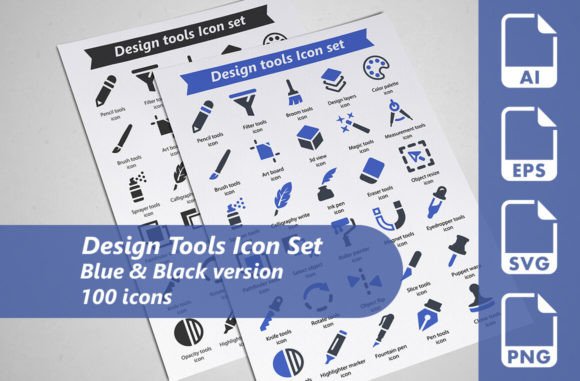
Every designer eventually runs into the same quiet frustration. You're building a landing page, laying out a presentation deck, or assembling an infographic, and you need that one icon—something that represents a design tool without looking clunky, generic, or out of place. You dig through free libraries, stitch things together, and still end up with a mismatched collection that whispers amateur. That's where a Design Tools Icon Set changes the rhythm of a project completely. This isn't just a folder of tiny images. It's a carefully curated system of 100 purpose-built icons, delivered in multiple file formats and color variations, ready to slot into almost any creative workflow without friction.
The collection includes 100 distinct design tool icons, each rendered in two color versions—blue and black—giving you 200 total assets to work with. But the numbers only tell the surface story. What matters more is how these icons behave in the hands of different people, across different projects, under different constraints. When an icon set is meticulously designed, it stops being a simple resource and starts functioning like a quiet collaborator, doing heavy lifting in ways that go unnoticed by everyone except the designer who chose it.
When Icons Become Infrastructure in Web and App Design
Think about the last SaaS dashboard you used. Somewhere in the sidebar, tucked into navigation elements or feature callouts, were small, crisp icons that guided your eye without demanding attention. These moments feel effortless to the user, but they represent hours of decision-making for the UI designer. The Design Tools Icon Set becomes particularly useful here because it's not trying to be trendy. The icons carry a clean, professional finish that reads clearly at small sizes—exactly what interface design demands. Developers integrating SVG files at 128×128 pixels find that scaling them down to 16px or 24px doesn't introduce artifacts or blurring, which is a persistent headache with lesser icon packs.
For teams building design platforms or portfolio sites specifically aimed at creative professionals, the subject matter hits close to home. An icon of a pen tool, a color picker, or a grid system immediately resonates with the audience. It creates a sense of shared understanding. When a visitor sees a familiar tool rendered as a thoughtful icon inside a feature comparison table, the brand gains credibility by association. The blue and black color options give designers flexibility too—blue for primary action elements, black for neutral information hierarchy, or vice versa depending on the brand palette.
Presentation Decks That Don't Look Like Everyone Else's
There's a particular agony in putting together a pitch deck at the last minute and realizing every icon you pull from the default library has appeared in three other presentations your client has already seen. The Design Tools Icon Set offers an exit from that visual fatigue. Because the 100 icons focus narrowly on design tools—rather than a broad, diluted theme—the consistency feels intentional rather than generic. A UX agency pitching a redesign can illustrate each phase of their process with icons that actually look like the tools their team uses. Wireframing, prototyping, user testing, asset handoff—each step gets a visual anchor that keeps slides from drowning in bullet points.
The fully editable vector AI files unlock a level of customization that static PNGs simply can't offer. Need to match the icons to your deck's accent color? Open the AI file, adjust globally, and export. Want to animate individual elements inside an icon for a keynote presentation? The layered vector structure makes that possible without rebuilding anything from scratch. These are the kinds of workflow advantages that don't appear in a feature list, but they make a tangible difference when you're working against a deadline and the stakes are high.
Print Materials Where Pixel Perfection Isn't Enough
Print design punishes low-resolution assets mercilessly. A logo mark that looked crisp on screen becomes a pixelated embarrassment on a trade show banner or a brochure cover. The inclusion of EPS files at 256×256 pixels, saved in EPS10 format, speaks directly to this reality. When a print designer opens an EPS icon from this set in Illustrator or CorelDRAW, they're working with true vector data that scales infinitely. That means the same icon can live on a business card, a poster, and a billboard without any quality loss.
Consider a design agency producing branded leave-behind materials for a conference. They might use the Design Tools Icon Set to create pattern backgrounds on tote bags, highlight specific services in a printed capabilities booklet, or build an oversized wall graphic that spells out their process using visual metaphors. The transparent PNG versions at 256×256 pixels also serve as quick-access assets for layouts in InDesign or Photoshop where full vector editing isn't necessary. Having multiple formats ready—AI, EPS, SVG, PNG—eliminates the tedious back-and-forth of file conversion that eats into creative time.
Infographics That Explain Without Overwhelming
Infographics live or die by their ability to simplify complexity. The best ones use visual shorthand that readers absorb before they even realize they're learning something. Icons from the Design Tools Icon Set function as that shorthand in contexts where the subject matter involves creative processes, software comparisons, or workflow explanations. A timeline showing the evolution of design tools over decades becomes more engaging when each era is represented by an icon that captures the spirit of the tools available at the time. A comparison chart between different design software suites feels more authoritative when the visual markers look professional and accurate.
Because each icon is individually crafted rather than auto-generated from a template, subtle details come through even at moderate sizes. The difference between a stylized pen tool icon and a generic drawing tool icon might seem minor, but audiences who work in design notice these distinctions. They register authenticity. When your infographic respects the visual language of the community it's speaking to, trust builds faster and information retention improves. That's not marketing jargon—it's observable behavior in any well-designed piece of visual content.
Promotional Materials and the Art of Standing Out
Social media graphics, email headers, and digital ads compete in some of the most cluttered visual environments on earth. A promotional post for a design course, a creative tool, or a freelance service needs to stop the scroll in milliseconds. Using icons that feel fresh and precisely relevant gives your promotional content an edge that stock imagery can't replicate. The Design Tools Icon Set works especially well here because the subject matter is aspirational—people browsing design-related promotions are already interested in the tools of the trade. Seeing those tools represented beautifully triggers recognition and curiosity simultaneously.
For businesses selling design assets, templates, or educational resources, these icons become building blocks for consistent campaign visuals. You can rotate through different icons across a series of posts while maintaining a unified aesthetic. The two color variations—blue and black—offer enough restraint to feel cohesive while giving you options for light backgrounds, dark backgrounds, and brand color overlays. And since the AI files are fully editable, you can extract individual elements, combine multiple icons into a larger illustration, or adjust line weights to match your specific promotional style.
Illustrations Enriched by Modular Visual Elements
Illustrators working on editorial pieces, book covers, or concept art often need to incorporate symbolic objects that communicate ideas quickly. Rather than drawing every tool from scratch—a process that can derail momentum on a tight timeline—they can pull relevant icons from the set and integrate them into larger compositions. The layered vector structure means an illustrator can isolate parts of an icon, recolor sections, or use them as reference shapes that get further refined.
This modular approach shines in projects like educational e-books about design principles, where chapters might feature custom spot illustrations that include recognizable tool icons. Students reading about typography see a beautifully rendered type tool icon next to the chapter heading. The icon isn't the star of the page, but it contributes to an atmosphere of care and craftsmanship that makes the content feel more valuable. The transparent PNG files make this kind of integration seamless across Procreate, Affinity Designer, or any other illustration software that accepts raster imports.
Who Benefits Most—and in What Ways
Freelance designers working solo get perhaps the most immediate lift. They're often handling everything—branding, web design, social media, client presentations—and an icon set that works across all those channels reduces the cognitive load of asset management. Instead of maintaining five different icon libraries with five different aesthetic sensibilities, they can rely on one cohesive collection that covers a wide range of design tool representations. The SVG format at 128×128 pixels integrates cleanly with Figma, Sketch, and Adobe XD, while the PNGs drop right into Canva or PowerPoint when quick turnaround is the priority.
Small to mid-sized agencies benefit differently. They have multiple designers touching the same project files, and consistency across handoffs becomes critical. When everyone on the team pulls from the same Design Tools Icon Set, the visual language stays locked regardless of who built which section of a proposal or which screen in a prototype. The EPS and AI files also future-proof the agency's asset library—today's project might need icons at 256×256 pixels, but next year's rebrand could require the same icons at ten times that size for environmental graphics. Vector formats make that scaling trivial.
Design educators and content creators occupy another valuable use case. Tutorial videos, online courses, and blog posts about design tools often need visual aids that show exactly which tool is being discussed. A screenshot can work, but it's messy and context-dependent. A clean icon representing the tool communicates the idea faster and looks more professional on a slide or a thumbnail. Over time, students begin to associate the icon style with the instructor's brand, which builds recognition and loyalty in an increasingly crowded educational marketplace.
Practical Considerations Before Integrating the Set
No icon set is universally perfect, and the Design Tools Icon Set rewards a bit of upfront planning. The 100 icons are focused narrowly on design tools, which is a strength when your project lives in that domain, but it's worth considering whether your broader content mix requires icons outside that category. If you're building a general-purpose website that also needs icons for finance, healthcare, or logistics, you'll likely need to supplement this set with additional resources. The stylistic consistency within the set is high, which means any supplemental icons you bring in will need careful vetting to avoid clashing.
File management is another consideration that experienced designers anticipate. With 200 total icons provided as individual files across multiple formats, you're looking at a substantial number of assets. Spending a few minutes organizing them into a logical folder structure—by format, by color variant, or by tool category—pays dividends when you're deep in a project and need to find the right icon quickly. The vector AI files offer the most flexibility but also require the most skill to edit effectively. If you're newer to Illustrator or vector editing, the PNG and SVG files provide plenty of immediate utility while you grow your technical comfort with the editable source files.
Color adaptation deserves a moment of attention too. The blue and black variants cover a lot of ground, but some projects will demand icons in brand-specific colors that don't align with either option. The fully editable vector files make global color changes straightforward, but they do require access to vector editing software. For teams working primarily in raster-based tools, this means an extra step in the workflow—opening the AI or EPS file, adjusting colors, and exporting to PNG or SVG manually. It's not a barrier so much as a rhythm shift worth factoring into your timeline.
Why Cohesion Matters More Than Quantity
The design industry has no shortage of icon packs. Some offer thousands of icons across dozens of categories, but breadth often comes at the expense of quality and cohesion. A set that promises everything frequently delivers inconsistency—line weights that vary, corner radii that don't match, and visual metaphors that feel stretched thin. The Design Tools Icon Set takes the opposite approach. By limiting the scope to 100 design-specific tools and rendering them with meticulous attention to detail, it achieves a level of visual unity that's immediately noticeable. When you place five of these icons next to each other in a layout, they feel like they belong together. That sense of belonging translates directly into professional credibility for whatever project they inhabit.
There's also an underappreciated psychological benefit to working with a focused, well-executed icon set. When you trust your assets, you make faster decisions. You stop second-guessing whether an icon conveys the right meaning or whether the visual quality is high enough. You place it, adjust the size, and move on. Over the course of a large project—especially one with dozens of screens, pages, or slides—those saved minutes compound into hours of creative energy that can be redirected toward bigger design challenges.
For anyone who has ever stared at an inconsistent icon grid at 11 PM on a Tuesday, wondering if anyone will notice that the spacing feels slightly off, the value of a cohesive set needs no further explanation. For everyone else, the Design Tools Icon Set offers a quiet assurance that the small details are handled, leaving more room for the work that actually matters.