The Practical Designer’s Guide to Choosing an Icon Set: What Makes Cupcake Icons a Reliable Option
Icons are the quiet workhorses of modern design. They guide users through interfaces, simplify complex ideas in infographics, and add personality to everything from mobile apps to printed flyers. But choosing the right icon set involves more than picking a style you like. You need to evaluate how well a collection fits your daily workflow, the range of formats it offers, the level of customization it allows, and how consistently it performs across different media. One collection that often comes up in these discussions is Cupcake Icons—a set of high-quality, minimalist icons built to adapt to a wide variety of projects. This article walks through what that set actually delivers, how it compares with the broader landscape of icon solutions, and how to decide whether it aligns with your practical needs.
What a Well-Structured Icon Collection Brings to Your Projects
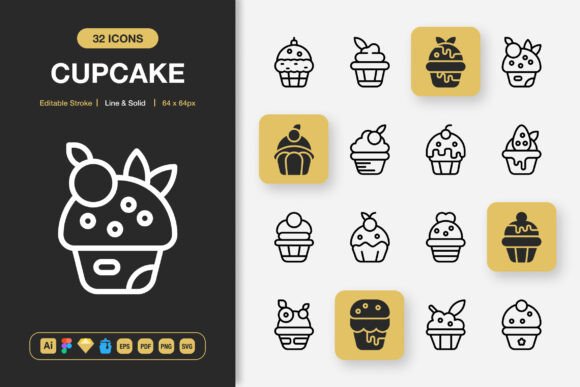
At its core, an icon set is a library of visual symbols. But not all libraries are created equal. Some are loose collections of inconsistently styled PNGs; others are meticulously crafted vector systems that you can reshape and recolor without losing clarity. Cupcake Icons falls into the latter category, offering 100 customizable icons in both line and solid styles. The value here is not just in the quantity, but in the internal consistency of stroke weights, corner radii, and visual proportions. When every icon in a set follows the same design rules, your project feels more considered, and you spend less time manually fixing mismatched elements.
Beyond consistency, a good icon set saves you from the cycle of hunting down individual icons from disparate sources. The drag-and-drop convenience of a well-organized file reduces assembly time. With Cupcake Icons, the emphasis on “high quality” isn’t about pixel perfection alone—it’s about keeping the editable stroke intact so you can tweak line thicknesses to match your brand’s typography or interface guidelines without starting over. That single capability often separates resource-friendly sets from rigid downloads that lock you into someone else’s aesthetic decisions.
How Cupcake Icons Balances Style and Adaptability
Minimalist icon design has become a default for good reason: it reduces visual noise and scales cleanly from tiny mobile screens to large-print posters. Cupcake Icons leans into that clean, unfussy aesthetic. The line style works well for airy, modern interfaces, while the solid variant provides the visual weight needed for bold call-to-action buttons or dense infographic layouts. Having both styles within a single set means you can maintain a unified visual language even when different sections of a project call for different emphasis levels.
Compared to icon families that offer only one style, this dual approach gives you more room to maneuver. For instance, you might use solid icons for primary navigation on a website and line icons for secondary list items—all while keeping the same geometric foundation. The tradeoff, naturally, is that a set of 100 icons with two styles still covers common use cases but won’t satisfy every niche. If your project requires dozens of very specific industry symbols, you may supplement with another resource. But for the typical mix of arrows, user profiles, communication symbols, files, and everyday UI elements, the coverage is generous.
File Format Support: A Practical Comparison with Typical Icon Downloads
One of the most underrated aspects of choosing an icon set is the range of file formats included. Many free or low-cost packs ship as a single SVG or a limited zip of PNGs. That forces you to convert, resize, or rebuild assets for different tools. Cupcake Icons takes a different approach by bundling source files for Adobe Illustrator, Figma, Sketch, and IconJar, alongside more universal formats like EPS, PDF, SVG, and multiple PNG resolutions.
Why does that matter in practice? Consider a workflow where your UI designer uses Figma, your illustrator prefers Adobe Illustrator, and your developer expects SVGs for the codebase. A single purchase can cover all those needs without conversion scripts or quality loss. The EPS and PDF options also lend themselves to print design, where vector integrity is paramount. Having PNG files in sizes ranging from 32px to 512px—including the all-important 48px and 256px breakpoints—eliminates the guesswork for social media graphics, presentation slides, or app icon previews. This multi-format approach compares favorably to the more common alternative of hunting for “PNG icons 512px” one by one. It’s not about having more files for the sake of it; it’s about reducing friction in a cross-disciplinary team.
Editable Stroke and True Customizability: What It Means for Your Brand
Not all vector icons are genuinely customizable. Some are outlined but expanded into shapes that lose their stroke properties, making line-weight adjustments a manual path-editing headache. Cupcake Icons emphasizes an “editable stroke” feature, which keeps the stroke data alive. That means you can globally change the thickness of an icon set to match a brand’s font weight—a small detail that has an outsized impact on visual harmony.
This level of control also simplifies color changes. Instead of isolating and recoloring merged shapes, you can apply a single stroke or fill color update across multiple icons. For teams that frequently rebrand or run A/B tests on interface elements, this is a substantial efficiency gain. The tradeoff is that fully editable strokes rely on the original design software to handle the data correctly. For maximum editability, you’ll want to work in the native Adobe Illustrator or Figma files, rather than a flattened SVG. This isn’t a flaw; it’s a practical consideration to keep in mind when comparing the promise of customizability with how you actually work day to day.
Where Cupcake Icons Fits Naturally into Real-World Projects
Let’s map the features to concrete scenarios. For a website redesign, the SVG and PNG package lets you use vector icons in the front-end code while supplying crisp PNG fallbacks for email templates. In a mobile app, the drag-and-drop availability in Figma or Sketch accelerates prototyping, while the consistent sizing ensures elements don’t need individual repositioning. For a book layout or educational flyer, the EPS and PDF formats integrate smoothly into Adobe InDesign or Affinity Publisher, maintaining sharp edges at 300 DPI print resolution.
Social media managers often juggle multiple platforms; using the 128px or 256px transparent PNGs from the set can keep Instagram story highlights or Facebook ad graphics looking cohesive without re-exporting from heavy design files. Infographic designers, who need to reduce complex data to clean visual shorthand, benefit from the minimalism and the dual-style system—solid icons for key data points, line icons for secondary notes. In all these cases, the fact that the set includes 100 icons means you can cover most common symbols (search, user, settings, notifications, file, folder, chat, calendar, location, and so on) without needing to commission custom work.
Understanding When a Different Icon Strategy Might Serve You Better
No single icon set is perfect for every situation. Cupcake Icons is designed for flexibility, but it’s anchored in a specific minimalist style. If your brand identity uses thick, hand-drawn, or highly illustrative icons, a clean geometric set might feel too sterile. In that case, commissioning custom illustrations or looking for a sketch-style alternative could be worth the investment. Similarly, if you need an extensive library with thousands of icons covering very specialized domains—say, medical, scientific, or technical categories—a set focused on 100 everyday UI symbols may leave gaps you’ll need to fill from other sources.
There’s also the question of total cost versus up-front convenience. While the included bundle of software-specific files saves time, if your team works exclusively in one tool and never needs print-ready assets, you might be paying for formats you won’t use. That said, multi-format inclusions tend to future-proof a purchase; teams evolve, and having a Sketch file on hand today doesn’t mean you won’t switch to Figma tomorrow.
Another consideration is the learning curve aspect. The “easy drag and drop” experience is genuine inside supported apps, but if you’re a solo developer who rarely opens design software, you might prefer a simple icon font or an SVG sprite approach—though these lack the per-file editability that Cupcake Icons provides. There’s no universal answer; the decision hinges on whether you value deep customizability and cross-application compatibility over a more plug-and-play streamlined integration.
Comparing Cupcake Icons with Other Distribution Models
The icon market is broad. Some platforms let you download individual icons in a single style as SVGs with no source files. Others operate on a subscription basis, offering vast libraries but ongoing costs and often unpredictable licensing. Cupcake Icons occupies a middle ground: a one-time purchase of a finite but well-curated set, delivered with the source files that let you truly own the assets. This model suits freelancers and small studios who want to avoid recurring fees and retain the ability to modify every glyph without restriction.
When you compare it to free repositories, the quality and consistency difference becomes apparent quickly. Free icons can be a mixed bag of varying stroke weights, poorly aligned bounding boxes, and limited color editing due to expanded paths. The premium approach of Cupcake Icons—with its editable stroke, multi-format delivery, and same-designer cohesion—reduces those hidden time costs. The tradeoff, of course, is the initial investment. For a project with a tiny budget and minimal brand consistency demands, free options might suffice. But for client-facing work where crispness and editability affect your professional reputation, the calculation often shifts toward a reliable, source-file-rich set.
How to Evaluate Long-Term Value Beyond the Feature List
A feature list tells you what an icon set includes; it doesn’t tell you how it will age with your projects. With Cupcake Icons, the Readme.txt file might seem like a minor inclusion, but a well-documented set helps new team members understand licensing, file structure, and usage tips without digging through email threads. The inclusion of IconJar file support also speaks to a consideration for organized asset management—IconJar being a tool that many designers use to search and drag icons directly into their work. That’s a subtle indicator that the set was built by people who understand design workflows, not just people who can draw beautiful icons.
When comparing long-term usefulness, think about how many times you’ll reuse these symbols across projects. A set with 100 flexible icons can appear in dozens of client websites, pitch decks, internal dashboards, and printed materials before you feel the need for something else. The transparent PNGs at multiple sizes mean you won’t have to re-export for years, and the editable source files future-proof you against rebrands. That kind of longevity is what moves an icon collection from a one-off asset to a foundational design resource.
Making the Decision: Factors to Weigh in Your Selection Process
If you’re in the middle of evaluating icon solutions, stepping back to list your actual requirements can cut through the noise. Ask yourself whether you need editable strokes or if flat, merged SVGs will do. Determine which tools your team uses daily—Figma, Sketch, Illustrator, or a mix—and check if the icon set provides native files for each. Consider the types of projects you typically handle. If they span web, mobile, print, and social media, the multi-format coverage of Cupcake Icons can eliminate the need for multiple icon sources. If you only ever need SVGs for one web app, you might streamline your purchase accordingly, though you lose the flexibility of the source files.
Also reflect on the visual language. Minimalist design is versatile, but it’s not a universal fit. Review the icon set’s preview carefully to see if the proportions and stroke terminals match your brand’s tone. The line and solid style combination gives you creative range, but if your baseline aesthetic is highly ornate, the set’s strength—its clean simplicity—becomes a mismatch.
Licensing is another quiet factor. Many designers overlook it until it causes a problem. A set that allows broad commercial use and modification gives you peace of mind when the icons appear in client deliverables, merchandise, or application interfaces. Make sure the included Readme clarifies those boundaries.
Integrating Cupcake Icons into a Larger Design System
For those building or maintaining a design system, consistency across components is everything. Cupcake Icons can serve as the foundational icon layer, especially when you use the Figma or Sketch files to create component variants with different style overrides. Because the icons are built with care, you can set up a library of button components that swap between line and solid styles dynamically, all while maintaining alignment and padding. The editable stroke lets design system maintainers tokenize the stroke weight so that a brand refresh automatically ripples through every instance. This approach is far harder to achieve with icons that arrive only as static PNGs or flattened SVGs.
When you compare the effort of building a custom 100-icon set from scratch versus adapting a high-quality existing set with full editing rights, the math heavily favors the latter unless you have very specific stylistic needs. Custom work can easily cost hundreds of hours in design and QA. A well-structured set like Cupcake Icons collapses that timeline while still giving you the control over final look and feel. The key is that you aren’t just buying readymade graphics; you’re buying an editable foundation that you can make your own.
Final Thoughts on Choosing the Right Tool for Your Visual Language
Design decisions rarely come down to a single feature. They’re about fit: how a resource slots into your existing tools, how much time it saves during tight deadlines, and how much creative freedom it leaves on the table. Cupcake Icons distinguishes itself by offering a balanced combination of minimalism, editability, and broad format support—qualities that suit a wide range of projects, from mobile apps to printed books. Its strengths lie in consistent geometry, the practicality of having both line and solid styles, and the drag-and-drop readiness across major design applications.
The main situations where you might look elsewhere are when your project demands a vastly larger icon library, a radically different artistic style, or a zero-cost option. For those who need dependable, customizable, and professionally crafted icons that play nicely with multiple tools, this set is a solid, forward-thinking investment. By understanding not just what’s included but how each feature translates into everyday workflow improvements, you can make a decision that supports your creative work long after the initial download.