Space Icon Set: 80 Beautifully Icons for Any Project
When you are working on a creative project and need a cohesive visual language, the right icon pack can make all the difference. The Space Icon Set is a collection of 80 thoughtfully crafted icons that capture the wonder of the cosmos. Instead of hunting down individual graphics and trying to make mismatched styles work together, you get a ready-made toolkit that feels consistent, professional, and easy to adapt.
At its core, this set revolves around everything related to outer space. You will find planets, astronauts, rockets, satellites, stars, moons, telescopes, and more. But the real value is not just the topic—it is the attention to detail. Every icon has been meticulously designed to work across a wide range of modern design environments, from a startup’s landing page to a science teacher’s classroom handout.
What Makes This Collection Stand Out
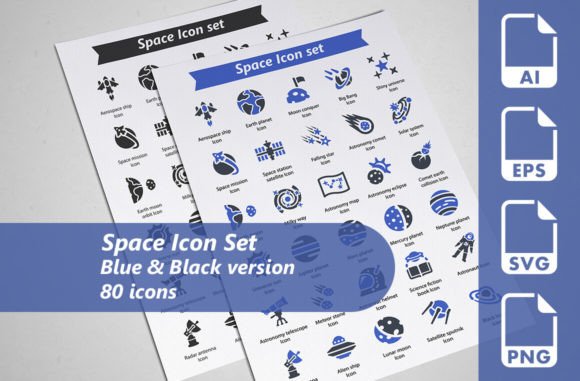
Not all icon packs are built with the same level of care. With the Space Icon Set, the first thing you will notice is the sheer versatility. The package includes two distinct color variations: a classic blue edition and a sleek black edition. That means each of the 40 unique icons appears in both colorways, giving you a total of 80 ready-to-use design assets. Having two integrated color palettes means you can match the icons to a dark-mode app interface, a vibrant poster, or a minimalist infographic without extra recolor work.
Another highlight is the file format flexibility. The icons come as fully editable vector AI files, which means you can open them in Adobe Illustrator and change details, resize them infinitely without quality loss, or extract elements for larger illustrations. For web and app developers, the SVG files (each sized at 128×128 pixels) are a direct drop-in solution that stays crisp on any screen. The EPS files, provided in EPS10 version at 256×256 pixels per icon, ensure compatibility with older or specialized design software. And if you just need a quick transparent PNG (also 256×256 pixels), you have a straightforward raster option that can be placed directly into presentations, documents, or image editors.
This structure means you are not locked into one workflow. Whether you are a graphic designer who works daily in vector tools, a freelancer who needs to quickly mock up a client’s website, or a hobbyist putting together an educational slideshow, you will find a file format that slots right into your process.
Who Actually Needs Space Icons?
It is easy to assume that a Space Icon Set is only for astronomy websites or sci-fi authors. In reality, the appeal is much broader. Space imagery often symbolizes exploration, innovation, ambition, and the unknown. That makes these icons surprisingly useful across many fields.
For entrepreneurs launching a new tech product, a rocket icon can become a recurring motif for speed and growth. For marketing teams crafting social media posts about a groundbreaking campaign, small planet or star icons can add a subtle layer of excitement without dominating the message. Even blogs covering personal development, mindfulness, or life coaching can use celestial visuals as gentle metaphors for dreaming big.
Of course, the obvious applications still shine. Science educators can use the icons to create labeling activities, flashcard materials, or interactive quizzes. Amateur astronomy groups can enrich their newsletters or event flyers. Children’s book illustrators can pull an astronaut or telescope from the pack and customize it to fit a narrative. Because the icons are fully editable vectors, they can be resized, recolored, and combined to fit a specific age group or aesthetic.
Real-World Uses Across Different Mediums
One of the strengths of a large icon bundle like this is its adaptability to both digital and physical spaces. Let’s walk through a few concrete scenarios.
Website and App Design
Imagine you are building a site for a space-themed summer camp. Navigation icons, category markers, and even decorative elements all need to feel unified. By pulling from the Space Icon Set, you can keep the entire interface consistent. The SVG files load quickly and scale without blurring, which is essential for responsive design. Even if the site evolves, you can always go back to the original AI file and tweak an icon’s stroke weight or color to match a new brand direction.
For mobile apps, the black version is particularly useful because it can adapt to light and dark system themes with minimal design work. A constellation icon used as a menu tab keeps the app feeling cohesive while still clearly communicating its purpose.
Printed Materials and Promotional Items
Print design demands high resolution and precise color rendering. Since the pack includes EPS and high-quality PNG files at 256×256 pixels, you can produce clean brochures, poster series, or event banners. A local planetarium, for example, could use the blue versions to create an eye-catching flyer with icons for showtimes, ticket info, and educational highlights. Because the icons are vector-based at their core, scaling the graphics to signboard size is not a problem.
Promotional merchandise also benefits from the editable nature of the files. A T-shirt designer might open the AI file, remove some details to create a bolder silhouette, and then export a print-ready graphic. That same icon set can then be used on stickers, tote bags, and social media posts, keeping the entire campaign visually unified.
Presentations and Infographics
Whether you are a student presenting a research project on lunar phases or a project manager explaining a roadmap in business terms, the right visual can anchor your message. Instead of relying on generic clip art, you can drop in transparent PNG icons that directly relate to your slides. The blue versions add a professional, calm tone that works well for corporate environments, while the black versions offer a more dramatic contrast on lighter backgrounds.
For infographics, the pairing of the two color variants opens up creative possibilities. You might use the blue icons to highlight factual data points and the black icons for commentary or guiding questions. This subtle visual coding helps viewers scan the infographic more quickly and understand the hierarchy of information.
Getting Started Without Overwhelm
With 80 icons and multiple file formats, it can feel like a lot to take in at first. The best approach is to start small. Open the folder, pick one icon—say, a simple star or a crescent moon—and place it into a document you are currently working on. Notice how quickly it settles into the design. From there, you can gradually explore the full set, experimenting with the blue and black editions to see which one fits your project’s mood.
If you are not a trained designer, don’t worry. The transparent PNG files are as easy to use as any image you would download from the web. You can insert them into Google Slides, Canva, Microsoft Word, or even a basic photo viewer. If you want to dig deeper, the vector AI and SVG files open the door to limitless customization, but you do not need to master those tools on day one.
Things to Consider Before You Buy
While the Space Icon Set is designed to be accessible, a few honest considerations can help you decide if it is the right fit for your needs.
- Software compatibility: The vector AI files require Adobe Illustrator or compatible software like Affinity Designer or Inkscape. If you plan to do heavy customization, make sure you have access to a vector editing tool. The EPS and SVG formats broaden compatibility, but editing them is still more straightforward in vector-capable apps.
- Use case variety: Think about your actual projects. If you only need a single rocket or planet icon, you might be tempted to find a free alternative. However, if you anticipate reusing space imagery across several projects—or if brand consistency matters—investing in a paid, professional set like this saves time and avoids the patchwork look of mixing free icons from different sources.
- Licensing and distribution: Always check the license terms that come with the files. Typically, such icon sets allow use in personal and commercial projects, but it is worth confirming whether you can include them in products you resell, like templates or physical merchandise, without extra attribution.
Why Meticulous Design Matters
It is tempting to overlook the aesthetic quality of icons and just focus on the quantity. But poorly spaced lines, inconsistent stroke weights, and odd proportions can make an otherwise well-designed layout feel amateurish. With this set, each icon was drawn with careful attention to balance and readability. Even at very small sizes—think as tiny as a favicon or a bullet point—the shapes remain clear. At larger sizes, you will not see jagged edges or awkward curves. That level of polish saves you from having to clean up or repair someone else’s work.
The two-color approach is also a subtle but powerful feature. Having a pre-made blue edition means you do not have to guess the right shade of space-blue; it is already chosen to look crisp on light and dark surfaces. The black edition eliminates any color guesswork entirely and works as a versatile monochrome option that fits into corporate branding, minimal layouts, or any design with a strong contrast requirement.
Building a Cohesive Visual Story
One of the biggest mistakes beginners make is mixing icon styles: a flat icon next to a 3D icon, a thick stroke beside a thin one. The Space Icon Set removes that risk. Since all 40 unique designs share the same visual DNA, you can mix and match them freely. Want to create a solar system infographic with an astronaut in the corner? The consistency lets the composition feel intentional rather than thrown together.
This cohesion becomes even more valuable when you collaborate with a team or hand off files to a client. Instead of explaining which icon style to use, you can simply share the entire folder and know that any combination will look harmonious. For marketing agencies or educators who regularly produce space-related content, this is a huge time saver.
Making the Most of File Formats
Knowing which file to use for which task will help you get the best results:
- SVG (128×128px): Ideal for websites, apps, and any project that needs scalable, lightweight graphics. These can be manipulated with CSS for hover effects or animations.
- EPS (256×256px, EPS10): Great for opening in vector software that might not support the latest AI format. Use these for professional print work that requires maximum compatibility.
- AI (fully editable): Your go-to if you need to change shapes, merge icons, or adjust colors beyond the two included variants. Full creative control lives here.
- Transparent PNG (256×256px): The quickest option. Drag and drop into presentations, social media graphics, or non-design tools where you just need a clean, finished image with no background.
If you are new to vector files, start with the PNGs and slowly experiment with the SVG format. Over time, you will build confidence and unlock the full potential of the set.
Keeping Your Design Project Fresh
The space theme has a timeless quality. Unlike trendy icon sets that might feel dated in a year, celestial imagery remains relevant. As long as people look up at the sky and wonder, there will be a place for astronauts, planets, and galaxies in design. By choosing a well-built resource now, you are storing up assets that you can return to for future projects, whether that is a blog relaunch, a new product line, or a classroom activity five years down the road.
And when updates or client feedback inevitably come, having the fully editable AI files means you are never stuck. A small adjustment to a rocket’s fin or a change to the thickness of a planet’s ring can be handled in minutes, without needing to redraw anything from scratch.
Simple Ways to Put Icons to Work Right Away
If you are excited to use the Space Icon Set but unsure where to begin, here are a few beginner-friendly projects:
- Event invitations: Replace standard bullet points with tiny stars or planets to give a party invite a dreamy, celestial feel without overwhelming the text.
- Resume or portfolio: For creative fields, a subtle constellation or telescope icon can serve as a decorative section divider, adding personality while staying professional.
- Online course materials: If you teach any subject remotely, adding space icons to your worksheets or slide decks can make lessons more engaging and visually structured.
- Social media highlights: Use the transparent PNGs to create icon-based story covers for Instagram or Facebook that group your content by theme—rocket for announcements, moon for tips, etc.
The beauty of a diverse icon pack is that you start seeing opportunities everywhere. Once you have the files on your computer, you will find yourself reaching for them whenever you need to communicate an idea with a clean, recognizable symbol.
Support and Updates Along the Way
The creator of this collection encourages questions, feedback, and honest ratings. That kind of openness often means you can get help if something is unclear about the file structure or if you need a small clarification about usage rights. Leaving a comment or review not only helps the designer improve but also lets other buyers know how the icons worked in real projects. If you find the icons useful, taking a moment to leave a rating can go a long way in supporting independent creatives who put in the hours to make meticulously designed resources.
In the end, a thoughtfully built icon set like this one is more than just a folder of graphics. It is a shortcut to professional-looking results, a safety net for consistent branding, and a source of creative fuel for everything from the simplest blog post to the most ambitious product launch. When you have 80 beautiful space icons ready to go in multiple formats and two cohesive color schemes, you spend less time searching and more time creating.