Car Paint Icons: High-Quality Icons for Every Project
When you work on a visual project—whether it’s a mobile app, a printed flyer, a social media graphic, or a detailed infographic—the small details often define how polished the final result feels. Car Paint Icons give you that edge. This set delivers a collection of meticulously crafted icons dedicated to automotive painting, detailing, and vehicle care, designed to blend seamlessly into clean, modern layouts. You don’t need to be a professional illustrator to use them. The pack is built for anyone who wants to add crisp, meaningful visuals without spending hours drawing or searching scattered libraries.
What You Get with the Car Paint Icons Set
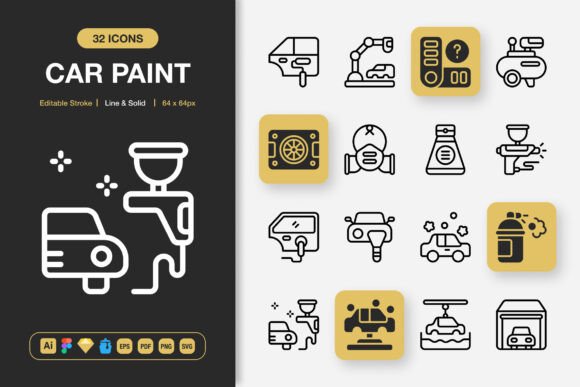
At its heart, the collection is a dual-style icon pack. Every icon comes in both line and solid styles, so you can maintain a consistent look across different sections of your design. The line style feels airy and contemporary, perfect for user interfaces or editorial layouts that rely on white space. The solid style offers bolder visual weight for call-to-action areas, labels, or printed banners that need to pop from a distance.
All icons share a fully editable stroke. That means you can adjust thickness, change corner rounding, or even switch stroke caps without distorting the icon’s original geometry. Creators who value adaptability will appreciate that nothing is flattened or locked. You get 100% vector control while keeping the base shape professional and clear.
Why Different Users Gravitate Toward These Icons
Different audiences see different value in the same asset. A beginner creating their first car-themed website might care most about how fast they can drag an icon into a page builder and have it look intentional. For them, the drag and drop ease and the ready-to-use PNG files in sizes from 32px up to 512px remove technical barriers. They don’t need to understand vector software; they just need a transparent PNG that sits exactly where they want it.
An experienced UI designer, on the other hand, may immediately reach for the Figma file or the Sketch file. They need the icons as components they can override, restyle, and nest inside larger design systems. The editable stroke becomes crucial here because it lets them sync icon line weights with their typography scale. Consistent 2px strokes across all UI elements make an app feel cohesive, and this set supports that precision.
Print professionals often turn to the Adobe Illustrator source file or the EPS version 10. They may need to resize an icon to fill a large banner without losing sharpness. Since every icon is vector-based, scaling to billboard dimensions keeps edges clean. They also value the PDF file for quick placements inside brochures or manuals where colour profiles and overprint settings matter.
Social media marketers and bloggers use these icons to create car-care infographics or quick video overlays. The SVG file format lets them animate icons later, while the transparent PNGs work directly inside Canva or other online editors. An icon of a paint spray gun or a buffing pad can instantly signal a topic without extra text. This speeds up content creation while maintaining a professional look.
Educators and workshop trainers use the clean icons for instructional flyers, safety sheets, or presentation slides. The readability of the distinct line and solid shapes helps learners quickly associate symbols with steps in a painting process. Complex ideas become easier to grasp when supported by consistent, simple graphics.
Key Features That Support Both Creative and Commercial Work
Several practical features set this collection apart and make it more than a typical icon download. Understanding these can help you decide if it aligns with your workflow.
- Line and Solid Style in One Pack: No need to buy two separate sets. Switch between styles depending on the visual density of your layout. Use line icons for light, minimal cards; use solid icons for navigation bars, pricing tables, or feature highlights.
- Editable Stroke: Adjustable stroke weight and cap style mean you can fine-tune the icons to match your brand guidelines or the typeface you’re using. This is especially valuable for corporate identities where icon thickness needs to mirror logo proportions.
- High Quality Construction: Each icon follows a uniform grid and optical balance. No awkward tangents or disproportionate shapes. That attention to detail saves you time you’d otherwise spend fixing poorly drawn vectors.
- 100% Customizable: Since the source files are open and layered, you can change colours, remove details, or combine icons to create new symbols. A car painter icon can be recoloured to match your shop’s brand palette in seconds.
- Easy Drag and Drop: The included PNG files with transparency let you simply drag visuals into presentations, e-books, or web pages. No export settings or clipping masks required.
Format Flexibility That Respects Your Workflow
The file set is deliberately broad because design pipelines vary widely. You receive everything needed whether you work offline, in the browser, or across multiple design tools.
- Adobe Illustrator (.ai) — full source file for deep editing
- Figma File — ready-to-use component library for collaborative interface design
- Iconjar File — quick icon management and organization for Mac users
- Sketch File — seamless integration for Sketch-based design systems
- EPS Version 10 — universal vector exchange for older software or print workflows
- PDF File — standard document format for proofing and print
- SVG File — optimized for web, easy to animate and style with CSS
- PNG Transparency — raster versions at 32px, 48px, 64px, 96px, 128px, 256px, and 512px, ideal for mockups, documents, and apps that don’t support vectors
- Readme.txt — straightforward instructions and licensing notes
Having all these formats means you won’t find yourself stuck mid-project because a file type is missing. A mobile app developer can pull SVG assets for on-screen icons while a publisher simultaneously uses the EPS for a product catalog—both from the same purchase.
Where Car Paint Icons Shine Brightest
Understanding the practical use cases can help even beginners see where these icons will make the biggest impact. They’re not limited to one vertical; they’re structured to work across many.
Websites and mobile apps: Use them for service menus, booking flow illustrations, or feature comparisons. A car detailing business can add icons for paint correction, ceramic coating, or interior shampoo next to service descriptions. Because the SVG and PNG files are lightweight, page load speed isn’t sacrificed.
Books, manuals, and educational materials: Illustrate step‑by‑step automotive painting guides. An icon of a dust mask, a spray gun, and a drying lamp can replace lengthy captions. Line icons keep the page uncluttered, while solid variants can highlight key warnings or tips.
Social media and infographics: In a crowded feed, a visually distinct icon stops the scroll. Pair a stat about paint durability with a strong solid icon. For Instagram stories or car-related YouTube thumbnails, the PNGs are already sized for quick overlays.
Flyers, banners, and posters: High-resolution PNGs ensure printed icons remain crisp even on large A3 or poster formats. Editable vectors allow you to adjust colours to match print‑specific CMYK profiles without quality loss.
Branding and marketing collateral: Small businesses can maintain a unified identity by using the same icon set on business cards, window stickers, and price sheets. The editable stroke lets you keep the line weight consistent with your logo, building trust through visual cohesion.
How Beginners and Pros Approach the Set Differently
A first‑time user might start by dragging the 256px PNG onto a Wix or Squarespace page and calling it complete—and that’s perfectly valid. The icons are designed to look good right away. No extra refinement is necessary for many basic needs. This speed and low barrier to entry make the set appealing for entrepreneurs running a car wash or body shop who can’t afford a graphic designer.
An experienced visual designer, however, will explore the editable strokes and Figma components. They may create a master colour style in Figma, apply it across all icons, and then export multiple icon states (hover, active, disabled) for a web app. The vector source file gives them the freedom to split complex icons into separate layers for micro‑interactions. That flexibility doesn’t overwhelm newcomers because they can simply ignore the deeper options until they need them.
Hobbyists and DIY crafters might use the icons for printable vinyl decals or custom t‑shirt designs. The high‑quality vector shapes mean a cutting machine can trace paths cleanly. The set’s attention to detail—no messy anchor points or unwanted overlaps—saves frustration in the workshop.
Matching Car Paint Icons to Your Project Goals
Before you download, consider what your project truly needs. If you are designing a polished mobile app that requires pixel‑perfect consistency across dozens of screens, the combination of SVG and Figma files, editable stroke, and line‑solid styles will likely serve you well. If your main goal is to quickly dress up a car‑related blog post with relevant visuals, the ready‑to‑use PNGs may be all you require. The set scales with you: you can start simple and grow into the more advanced files over time.
The inclusion of an Iconjar file also appeals to those who manage large asset collections. Dragging the whole icon pack into Iconjar gives you instant previews and search without opening heavy design software. This speeds up asset selection during fast‑paced client work.
Ultimately, Car Paint Icons succeed because they respect different skill levels while never compromising on quality. The minimalist design isn’t just trendy; it’s pragmatic. It helps icons stay readable at small sizes on mobile screens and remain elegant when blown up on a trade show backdrop. The simultaneous availability of line and solid styles means one set covers two distinct visual tones, reducing the need to juggle multiple icon libraries.
Bringing It All Together
Whether you’re a freelance designer building a client’s auto‑detailing app, a small‑business owner creating an eye‑catching price list, or a content creator looking for cohesive visuals across a car‑care channel, you’ll find that icon quality directly influences how your message is received. When icons are clear, consistent, and editable, they quietly reinforce professionalism. When they’re mismatched or low‑resolution, they become a distraction eroding trust.
The Car Paint Icons set removes that worry. It delivers an organized, thoroughly prepared pack of files that fits into seasoned design workflows as easily as it does into a first‑time user’s weekend project. The readme file clarifies usage rights, so commercial projects are covered. As your needs evolve—from simple flyer to interactive web app—the same icons can evolve with you because you hold the source files, not just flattened exports.
Next time you reach for a generic icon that almost fits your automotive theme, consider how quickly you could instead work with a dedicated, thoughtfully configured set. The time saved on editing, the visual boost, and the flexibility across platforms add up to a significant practical advantage.