Robot Head Icons: Minimalist Charm for Every Creative Project
Icon sets often get treated like afterthoughts. A quick download, a rushed placement, and the design moves on. But spend five minutes working with a truly well‑crafted icon family and you realize how much surrounding typography, spacing, and messaging suddenly click into place. Robot Head Icons are that kind of understated workhorse. They bring a clean, geometric personality that feels both playful and surprisingly sophisticated—the kind of balance that’s hard to find in a market flooded with either overly cartoony tech illustrations or ultra‑serious corporate pictograms.
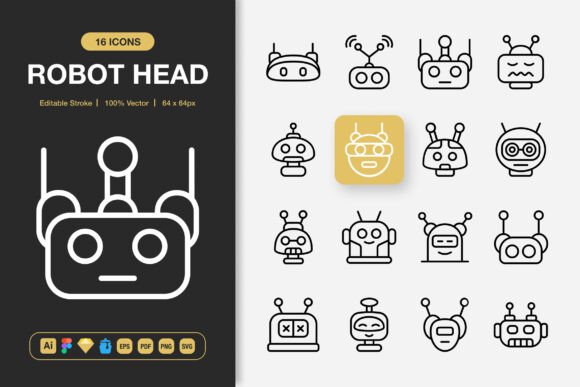
What makes this particular collection stand out isn’t flashy detail. It’s restraint. Each of the 100 customizable robot head designs relies on a consistent stroke weight, rounded terminals where appropriate, and an uncluttered silhouette that reads instantly at any size. Because the set is built around an editable stroke system, you’re not locked into a single look. Thicken the lines for an app icon that needs a bit more visual weight on a small screen. Thin them out for an editorial spot illustration where elegance matters more than impact. That level of control turns a static asset into a flexible design ingredient.
Where Playful Precision Meets Brand Personality
Robot Head Icons occupy a narrow but valuable niche. They’re not generic interface arrows or generic social media symbols. They express character. One icon might feature wide‑set antennae and an inquisitive optic lens, perfect for a robotics club flyer or a STEM education landing page. Another might use a squared jaw and a single glowing eye, ideal for a cyber‑security startup trying to add warmth without sacrificing authority. Because the entire set shares identical geometry rules—same curve radius, same stroke options—you can mix and match freely without the patchwork feeling that plagues cobbled‑together icon collections.
For brand identity work, this consistency is worth its weight. Imagine a small business card where a robot head replaces the traditional bullet point next to a phone number. Or a series of social media graphics for a podcast about emerging tech. When your audience sees the same visual language repeated across touchpoints, recognition deepens. It’s the same psychology behind choosing a modern typography system: repetition builds trust. Robot Head Icons function like a secondary logo set, subtly reinforcing that you care about details.
Icons That Complement, Not Compete With Your Typography
Pairing icons with type is an under‑discussed art. Too often, a beautifully chosen sans serif font gets undermined by icons that feel heavier, busier, or stylistically decades apart. Because Robot Head Icons stick to a minimalist, line‑based construction, they slide in alongside anything from a clean grotesk like Inter to a text‑friendly serif like Source Serif. Try placing one of these robot faces next to a bold marketing headline—the contrast between organic letterforms and mechanical geometry creates a visual tension that draws the eye without crowding the layout.
That interplay also improves readability. When you use icons as scannable entry points in a long web page or an infographic, you’re essentially building a visual hierarchy that guides someone through content faster. A small robot head beside a feature list tells readers “this point is about intelligence, automation, or tech” before they’ve read a single word. Done right, you’re not just decorating. You’re shaping comprehension speed, which is gold for social media graphics where attention spans hover around a second or two.
Real‑World Workflows: From Figma to Print Runs
One of the most practical reasons designers keep coming back to well‑packaged icon sets is the file flexibility. Robot Head Icons doesn’t toss you a single PNG and wish you luck. You’ll find source files for Adobe Illustrator, Figma, Sketch, and Iconjar, plus an EPS version and a tidy PDF reference. That’s not just icing—it’s a workflow multiplier. If the UI team works in Figma and the print designer prefers Illustrator, both can drag, drop, and recolor the same asset without conversion headaches. The SVG folder means web developers can inline icons directly, keeping sites fast while retaining the ability to animate strokes with CSS.
Then there’s the raster side. The included PNGs use transparency and come graduated across seven sizes: 32px, 48px, 64px, 96px, 128px, 256px, and 512px. For quick social media posts or a last‑minute slide deck, grabbing the 256px version and calling it done is a genuine time‑saver. But when you need that same icon to sit on a large‑format banner at an event, the 512px base gives enough density to upscale without the fuzzy edges that scream amateur. It’s a pragmatic range that accounts for both pixel‑perfect digital use and physical print requirements—flyers, posters, even merchandise mockups.
Why Editable Strokes Change Everything
Many icon bundles lock you into a pre‑set line thickness that doesn’t fit your brand’s visual weight. Maybe your logo uses a thin, elegant line, and suddenly a chunky icon throws off the entire mood. With Robot Head Icons, editing the stroke in Adobe Illustrator or Figma takes seconds. You can match the exact stroke value of your custom typeface or push it to a heavier weight for a badge design that needs to stand alone. This small feature bridges the gap between a generic icon and a bespoke design asset that feels intentionally crafted for your project.
I’ve seen this play out beautifully in editorial design. A magazine spread about artificial intelligence used a robot head icon as a small chapter marker, the stroke reduced to 0.75pt to mirror the delicate serif body text. It didn’t scream “tech illustration.” It simply added a quiet, structural note that lifted the page. That’s the sort of refinement that batch PNG downloads can’t offer.
Matching the Set to Your Project’s Tone
Before dropping these icons into a layout, it’s worth auditing the emotional tone of your project. Robot Head Icons lean friendly but not childish. They’re geometric but not cold. If your brand voice is highly formal, say a legacy financial institution, you might be better served by something more abstract. But for the vast middle—tech startups, educational platforms, maker communities, indie video game studios, content creators talking about AI, or even a quirky craft brewery with a sci‑fi naming scheme—the personality fit is remarkably natural.
Test them in context early. Grab the Figma file, drag a few variants into a mobile app frame, and check how they feel against live copy. Do they support the interface or distract? Because the set includes 100 icons, you have room to experiment. Maybe a rounded, friendly bot head works best for a sign‑up flow, while a more angular, helmet‑like design suits a security settings page. The internal variety keeps things from feeling like a one‑note gimmick.
Practical Tips for Non‑Designers
You don’t need an art degree to get real mileage out of these icons. Small business owners building a Shopify store can use the PNGs directly in product highlights or announcement bars. A teacher assembling a worksheet on robotics can pop a 128px robot head into a corner to signal a hands‑on activity. The drag‑and‑drop promise here isn’t marketing fluff—the file formats are prepped for exactly that. Even the Readme.txt walks through the structure so you’re not guessing which folder contains what.
When placing an icon into a design tool, pay attention to alignment. Even a perfectly drawn icon will look off if it’s optically centered instead of mathematically centered. These robot heads have varying internal shapes, so trust your eye. Also, try recoloring the stroke to a brand color rather than leaving it black. A navy or charcoal softens the contrast, while a bright accent hue like teal or orange can turn the icon into a deliberate focal point on an otherwise minimal page.
Scalability Across Digital and Print Realities
The 512px PNG might seem excessive until you need to output a 36‑inch‑wide poster for a tech conference. Downscale that sucker and the line crispness holds. But the true hero for scalability is the SVG format. Vector files don’t care about resolution. Whether your robot head appears at 16px in a browser favicon or 10 feet wide on a vinyl banner, the curves stay mathematically perfect. For web design, inlining SVG also keeps HTTP requests low, a small but real performance win.
Print designers should lean on the EPS or PDF files. These embed neatly into any packaging design or flyer layout without worrying about color profiles breaking. Because the icons are stroke‑based, you can easily apply spot colors if a print job calls for metallic ink or a neon specialty. That flexibility turns a humble robot face into a legitimate brand accent on product tags, sleeve designs, or postcard mailers.
Licensing That Keeps Pace With Your Ambitions
One of the quiet anxieties around any commercial‑leaning design asset is whether you’re allowed to use it in client work, merchandise, or an app that might eventually generate revenue. Robot Head Icons include clear commercial licensing terms in the Readme.txt, which means you can deploy them across multiple client projects, embed them in a mobile app, or feature them in a pitch deck without legal gray areas. This is the kind of practical clarity that protects both freelance designers and small teams scaling up.
For agencies managing multiple brand identity projects, a single‑license icon set that covers everything from social media graphics to printed banners eliminates the need to source separate assets for each client’s moodboard. It becomes a dependable tool in the studio’s toolkit, much like a trusted creative font collection or a go‑to color palette generator.
Building That Final Layer of Polish
Great design often hides in the margins. The tiny dot of an eye on a robot head, if perfectly aligned with surrounding text, can make a landing page feel engineered rather than assembled. Robot Head Icons reward that kind of attention. The geometric baseline of the set acts as an invisible grid, making it easier to stack icons in a navigation bar, list them as feature callouts, or weave them into an infographic’s narrative flow. Because the visual language is so consistent, even a non‑designer can create something that reads as intentional.
Don’t underestimate how much an icon set like this can anchor a logo design process, either. While these aren’t pre‑made logos, they can spark the central mark. Maybe a simplified robot head becomes the icon component of a wordmark, or a subtle variant lives in the corner of a letterhead. The editable stroke means you can tweak it until it feels inseparable from the brand name, then export the EPS file for a printer without losing fidelity.
Whether you’re refreshing a tired mobile app, crafting a new publishing imprint, or just trying to make a quarterly report look less like a spreadsheet graveyard, Robot Head Icons offer a level of control and charm that’s rare at any price point. The generous file stack—spanning AI, Figma, Sketch, EPS, PDF, SVG, and PNG in multiple sizes—removes the tech friction, leaving you free to focus on what actually matters: making the design feel human, even when the subject is a mechanical face.