The Quiet Power of Food Delivery Outline Icons in Modern Design
When you open a food delivery app, your eyes scan dozens of visual cues before you consciously read a single word. A motorcycle icon tells you delivery is available. A fork and knife suggest restaurant listings. A shopping bag signals your cart. These tiny visual markers do enormous work. The Food Delivery Outline Icons collection understands this unspoken language—and gives designers a ready-made vocabulary that feels both current and endlessly adaptable.
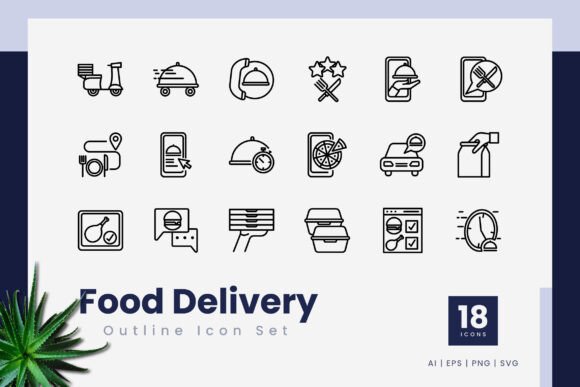
Outline icons have carved out a permanent space in contemporary interface design. Their lightweight, airy quality doesn't compete with photography or bold typography. Instead, they complement. A well-drawn outline icon sits on a screen like good punctuation in a sentence—barely noticeable when done right, jarring when done poorly. This particular set leans into that philosophy with 18 carefully constructed symbols that cover the essential touchpoints of any food ordering journey.
What Makes an Icon Set Worth Using
Not all icon collections are created equal. Some arrive bloated with hundreds of symbols you'll never touch. Others skimp on the fundamentals. The Food Delivery Outline Icons take a focused approach—18 icons that nail the core concepts without overwhelming you with filler. A delivery bag, a map pin, a clock, a payment card. Each one earns its place in the lineup.
But quantity isn't the real story here. The difference between a usable icon and a frustrating one often comes down to what happens under the hood. Stroke consistency. Anchor point placement. How gracefully the file scales from a 16x16 pixel favicon to a billboard-sized illustration. This set being 100% vector means you never have to worry about jagged edges or blurry corners, regardless of how far you push the dimensions.
The Editable Stroke Advantage
One feature that separates professional-grade icon sets from amateur alternatives is the editable stroke line. Instead of outlines that have been expanded into solid shapes—which lock you into a specific thickness—editable strokes let you adjust the line weight with a single slider. Need a delicate 1px stroke for a minimalist mobile UI? Done. The same icon needs to feel bolder at 3px for a presentation slide? Two seconds. This flexibility means the Food Delivery Outline Icons adapt to your project rather than forcing your project to adapt to them.
Think about how many contexts a single food delivery brand touches. The rider-facing app uses icons differently than the customer-facing website. The printed menu inserts icons next to dietary labels. The investor deck uses them in infographic layouts. An editable stroke turns a single icon set into a multipurpose toolkit that maintains visual consistency across every medium while respecting the unique demands of each format.
Where These Icons Actually Live
Designers don't work in a vacuum, and neither do icons. The real test of any icon set is how easily it integrates into actual workflows. The Food Delivery Outline Icons ship with file formats that cover the full spectrum of modern design needs, and that variety matters more than most people realize.
Working in Vector Software
If you live inside Adobe Illustrator or CorelDraw, the .ai and .eps files are your native territory. These formats preserve every editable property—stroke width, cap style, corner rounding—so you can dive in and customize without starting from scratch. Maybe your brand uses rounded caps instead of square ones. Maybe you need to adjust the curve of a particular icon to better match your existing icon family. Native vector files make those adjustments trivial rather than tedious.
The easy drag and drop functionality baked into the set saves you from the quiet frustration of importing files that arrive with unexpected clipping masks, locked layers, or mysterious grouping structures. Clean file organization is a feature, not an afterthought.
SVG for Digital Environments
The SVG files are where this icon set truly shines for digital product work. Unlike raster formats that pixelate at different resolutions, SVG icons remain razor-sharp on everything from a low-DPI budget laptop to a Retina display. They're also remarkably lightweight in terms of file size, which matters when you're loading dozens of icons across a restaurant listing page or a delivery tracking screen. Every kilobyte counts toward load time, and SVG delivers crisp visuals without the bandwidth penalty.
Developers will appreciate that SVG files from this set can be opened in any code editor. The markup is human-readable, which means you can animate individual strokes, change colors with CSS, or hook icon states into JavaScript interactions. A delivery status indicator that morphs subtly as an order progresses from kitchen to doorstep? That's possible when your icons arrive as clean SVG rather than flattened raster exports.
PNG Transparency for Quick Deployment
Not every project demands vector precision. Sometimes you need to drop an icon into a PowerPoint slide, a Canva layout, or an email template. The included PNG transparency files cover these scenarios without requiring access to professional design software. The transparent backgrounds mean the icons sit cleanly on colored buttons, photo overlays, or dark-mode interfaces without an ugly white bounding box ruining the effect.
This format diversity reflects a practical understanding of how design teams actually work. The UI designer grabs SVGs. The brand designer customizes AI files. The marketing coordinator pulls PNGs for the weekly newsletter. Everyone works from the same visual source, maintaining consistency without creating bottlenecks.
Designing for the Food Delivery Experience
The food delivery space has its own unique iconography needs that generic icon sets rarely satisfy. A standard "location" icon might work for a maps app, but food delivery demands something more contextual—a map pin near a restaurant, a delivery scooter, a thermal bag. These aren't interchangeable symbols. They carry specific meaning in a specific ecosystem.
The Food Delivery Outline Icons recognize this specificity. The 18 icons in the collection map onto the actual user journey: browsing restaurants, selecting items, confirming payment, tracking delivery, receiving the order. Each touchpoint has a visual anchor that reduces cognitive load. Users don't need to read "Track Your Order" if a familiar delivery vehicle icon sits right next to the text. The icon primes the expectation before the label confirms it.
Mobile App Considerations
Mobile interfaces present unique constraints. Screen real estate is limited. Touch targets need breathing room. Icons that are too detailed become visual noise at small sizes. The outline style naturally addresses these challenges. By stripping away fill colors and relying on clear silhouette recognition, outline icons maintain legibility even when rendered at 24x24 pixels on a phone screen.
For developers building food delivery apps, the high quality of these vectors means you're not fighting against poorly constructed paths that render inconsistently across Android and iOS. Cross-platform icon rendering can be finicky—what looks crisp on one operating system might appear slightly misaligned on another. Starting with clean, well-anchored vectors reduces the troubleshooting overhead.
Beyond Screens: Print and Presentation Uses
Digital products get most of the attention when we talk about icons, but the Food Delivery Outline Icons extend naturally into print and presentation contexts. Restaurant pitch decks often need to visualize operational flow—how orders move from customer to kitchen to courier. Infographics breaking down delivery radius expansion strategies benefit from clear, consistent iconography. Printed rider training materials use icon-based diagrams to communicate protocols without language barriers.
The vector nature of these files means you can scale a delivery bag icon to fit a trade show banner without any quality loss. The same icon that sits quietly in an app's navigation bar can command attention on a 6-foot-wide printed display. That versatility across media is something raster-dependent icon sets simply cannot offer.
Making Customization Part of Your Workflow
One of the quiet frustrations of working with third-party assets is the feeling that you're stuck with someone else's creative decisions. The editable stroke line feature inherently pushes back against that limitation. You can match the icon stroke weight to your brand's existing visual language. If your brand guidelines specify a particular line thickness or cap style, you can implement that consistently across all 18 icons without redrawing a single path.
Color customization follows the same principle. The outline structure means you can apply brand colors with a single click in any vector editing program. Need monochrome icons for a minimalist interface? One global color change. Need two-tone icons where the stroke carries one color and select details carry another? The editable paths support that without fragmenting into a mess of ungrouped shapes.
Why 18 Icons Is the Right Number
There's a temptation in the design asset marketplace to equate quantity with quality. Five hundred icons must be better than eighteen, right? Not necessarily. Large icon sets often dilute quality in pursuit of volume. They include symbols you'll never use, creating visual clutter in your asset library and making it harder to find the ones you actually need.
The Food Delivery Outline Icons take a curated approach. Eighteen icons cover the essential concepts without excess. You get delivery vehicles, food categories, ordering actions, location markers, and payment indicators. The set is compact enough that you can learn what's available and build muscle memory around which icon fits which context. When you're deep in a design sprint, scrolling through hundreds of marginally relevant icons is friction you don't need.
File Management That Respects Your Time
The included readme.txt file might seem like a minor detail, but it signals something important about how the icon set is organized. Good documentation—even a simple text file explaining file naming conventions, licensing terms, and format recommendations—saves the recipient from guesswork. It answers the "which file should I use for…" questions before you have to ask them.
Organized file delivery also matters for team environments. When multiple designers across different projects access the same icon set, consistent folder structure and clear format labeling prevent redundancy and version confusion. The easy drag and drop workflow assumes you can grab what you need and move on, not spend ten minutes deciphering an obscure folder hierarchy.
Practical Recommendations for Different Projects
If you're designing a food delivery app from scratch, the SVG files will be your primary resource. Import them into your design system, set up component libraries in Figma or Sketch using the SVG as a base, and establish color tokens that map onto your interface theme.
For presentation design, lean on the PNG transparency files. They insert cleanly into Google Slides, Keynote, or PowerPoint without requiring any vector import complications. Align them with your slide deck's accent colors and use them consistently across title slides, data visualizations, and section dividers.
Print designers working on menus, flyers, or operational signage should open the AI or EPS files in vector software. Scale them to whatever dimensions the layout demands, adjust stroke weights for readability at viewing distance, and export print-ready files with confidence that the edges will remain crisp.
Small business owners managing their own marketing materials can use the PNG files directly in Canva templates, social media graphics, or email headers. You don't need design expertise to benefit from professionally constructed iconography—just an eye for placement and consistency.
Consistency Across the Customer Journey
The real value of a dedicated Food Delivery Outline Icons set reveals itself over time. When customers encounter the same visual language across your app, your website, your confirmation emails, and your printed receipts, it builds subtle trust. The icons become part of your brand's visual signature without demanding attention. They support the content rather than distracting from it.
This consistency doesn't happen by accident. It requires an icon set that works across the full range of customer touchpoints, maintains quality at every size and resolution, and adapts to the technical constraints of each medium. The combination of multiple vector formats, editable strokes, and a focused selection of food-delivery-specific symbols makes that consistency achievable without requiring a dedicated illustration team.